See your church's plate and price in 30 seconds
Design it yourself on the next page. From $3.50 per plate, free shipping, no monthly fees.
10 Ways to Use NFC Tap Plates Beyond Giving
Yes, an NFC tap plate can link to any URL, not just a giving page. The plate is just a tiny chip that stores a web address; whatever URL you point it at is what opens in the user's browser when they tap. Churches use Tap.Giving plates for connect cards, sermon notes, prayer requests, event RSVPs, kids check-in, volunteer signups, podcast/sermon archive links, vCards, Linktree pages, and donor walls, alongside or instead of giving pages. Every plate can point to a different URL, and many churches order multiple sets for different purposes.
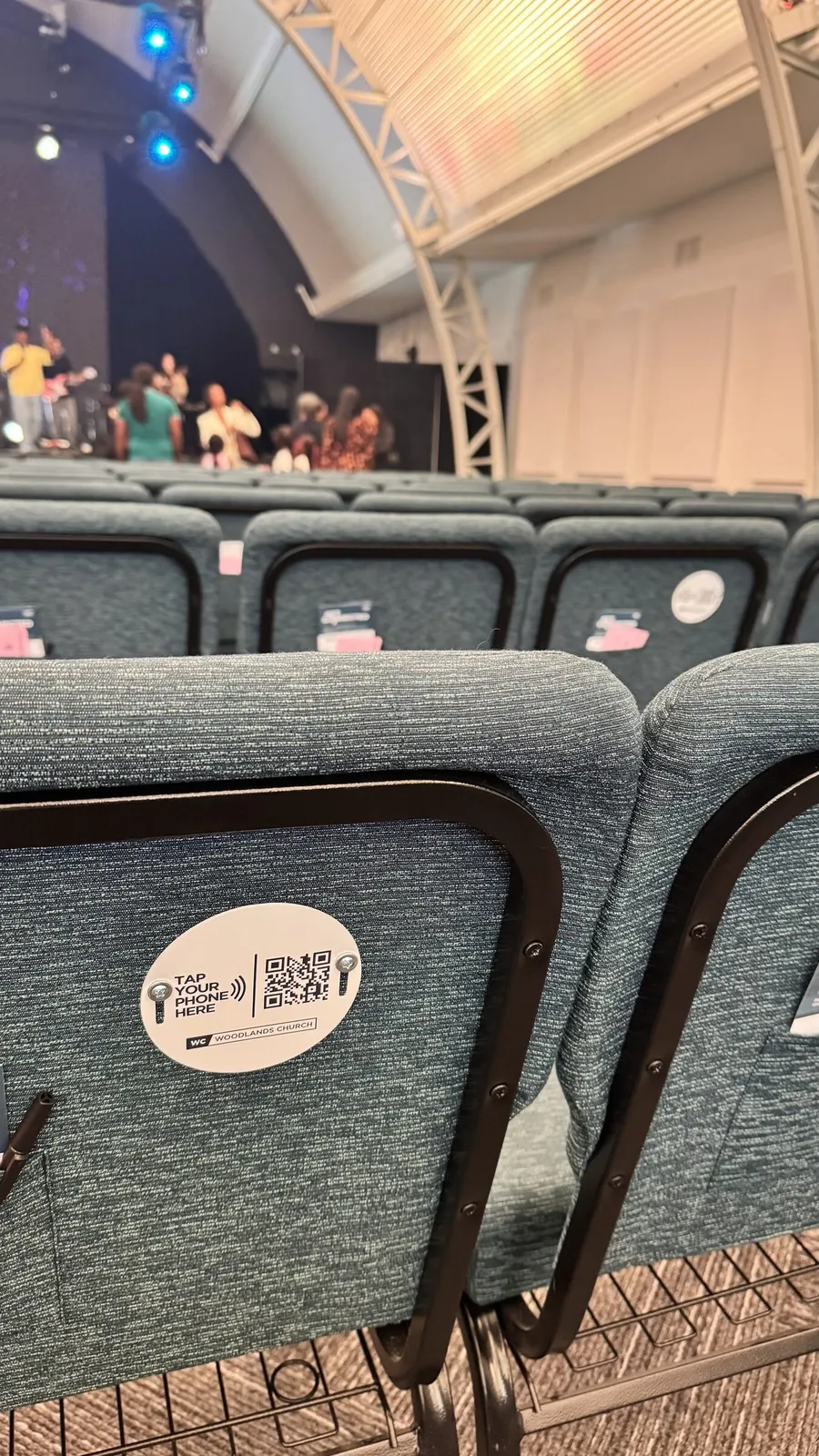
Yes, Tap Plates Can Link to Anything (How NFC Actually Works)
Most churches first hear about NFC plates in the context of giving, so they assume the plate is somehow tied to a giving platform. It's not. An NFC plate is a tiny passive chip, it stores one short piece of data, usually a URL. When someone taps their phone against it, the phone reads that URL and opens it in the default browser. No app. No login. No special setup on the church's end beyond writing the URL once.
That means the same physical plate that points at yourchurch.com/give could just as easily point at yourchurch.com/welcome or yourchurch.com/sermon-notes. The hardware doesn't care. The chip just stores whatever address you write to it.
Once churches realize this, the conversation changes. Suddenly NFC isn't just a giving tool, it's a way to bridge the physical sanctuary and your church's digital tools. Want to learn more about the underlying tech? Read our NFC giving explained guide or how it works.
10 Ways Churches Use Tap Plates Beyond Giving
Real use cases from churches using NFC plates for more than donations
1. Connect Cards for First-Time Visitors
The classic paper connect card, name, email, prayer request, "I'd like to know more" checkboxes, has been the backbone of guest follow-up for decades. The trouble is, fewer guests fill them out every year, and the ones they do fill out get lost between the offering plate and the office. An NFC plate on the back of a pew or at the welcome desk replaces the paper card with a tap-to-fill form on the visitor's phone. They're already holding their phone; tapping is easier than digging for a pen.
When this works best: First-time visitor flows where the goal is to capture contact info while the experience is fresh, typically right at the welcome desk or seat back.
Point the plate at: a Planning Center People form, Breeze form, Realm form, Mailchimp signup form, Tally form, or Linktree page with a "Connect" link. Example URL: yourchurch.com/welcome
2. Sermon Notes & Sunday Resources
Pastors spend hours preparing sermons and most of that work disappears the moment the service ends. A plate that links to this week's sermon notes, outline, scripture references, small group questions, recommended reading, extends the sermon all the way through Saturday. Drop a fresh URL in the same chip each week (if unlocked) or point a permanent plate at a stable URL like yourchurch.com/notes that always shows the latest message.
Why churches love this: It quietly trains the congregation that there's more to the sermon than what they hear on Sunday, and it gives small group leaders a one-tap way to grab discussion questions on the spot.
Point the plate at: a Notion page, Google Doc (set to view-only), church website sermon archive page, or a YouVersion event with notes attached.
3. Prayer Request Forms
Some people will never raise a hand or walk to the front, but they'll quietly tap a plate and submit a prayer request from their seat. NFC turns prayer into something private and immediate. Place plates at prayer stations, the back of the sanctuary, or at the foot of the cross during communion seasons. Make the form short, name (optional), request, and a checkbox for "share with prayer team" or "keep private."
When this works best: Anywhere you want to lower the bar for someone in a hard moment, without requiring them to talk to a stranger first.
Point the plate at: a simple Google Form, Tally embed, Jotform, or a dedicated yourchurch.com/prayer page.
4. Event RSVPs & Sign-ups
You announce VBS from the stage. People nod. They forget by Tuesday. A plate at the welcome desk or on a flyer turns "I'll think about it" into "I just signed up." Same for men's breakfasts, women's retreats, Easter outreach teams, fall festival volunteers, anything with a registration form. Visitors tap, fill out the form, and you have their info before they've left the parking lot.
Why churches love this: Event signup conversion goes up dramatically when the sign-up moment happens within seconds of the announcement.
Point the plate at: Eventbrite, Planning Center Events, Tito, Cvent, or your church website's event page.
5. Kids Check-in / Children's Ministry
The line at kids check-in is the worst part of Sunday morning for a lot of parents. A plate at the desk that opens your check-in URL on the parent's phone lets families self-check-in while volunteers handle the harder cases. This is especially useful for repeat parents who don't need staff help, they just need a fast path to the form.
When this works best: Mid-size and larger ministries where volunteer-led check-in becomes a bottleneck during the 5 minutes before service.
Point the plate at: Planning Center Check-Ins (mobile self check-in URL), KidCheck, KidMin Hub, or a custom check-in form.
6. Volunteer Signup
Most churches have a chronic volunteer shortage and a chronic problem: people say "I'd love to help sometime" and never follow up. A plate at the volunteer table or in the lobby that points at a "Where would you like to serve?" form catches that energy in the 30-second window after worship when someone actually feels moved to do something.
Why churches love this: The form captures volunteer interest while it's hot, before the parking lot conversation derails it.
Point the plate at: SignUp Genius, Planning Center Services (volunteer interest form), a Google Form, or your church website's /serve page.
7. Sermon Archive / Podcast Links
If your church has a podcast or YouTube channel, the plate is a one-tap subscribe button. Put plates on a postcard for first-time visitors, on the back of business cards, or at a "Listen on the go" station near the exits. People who would never type your podcast name into Spotify will tap a plate and start listening on the drive home.
When this works best: First-time visitor packets and any "take this with you" station near a sanctuary exit.
Point the plate at: your YouTube channel, Spotify show, Apple Podcasts page, or a single landing page that links to all three.
8. Pastor's Digital Business Card (vCard)
Pastors hand out a lot of business cards. Most end up in a drawer. A small NFC plate stuck to the back of a physical business card, or on the inside of a Bible cover, saves the pastor's contact info directly to the visitor's phone with one tap. Name, phone, email, address, and even a photo all populate the contacts app instantly.
Why pastors love this: Visitors who would never type a phone number into their phone will tap a plate and have you saved before they leave the conversation.
Point the plate at: a hosted vCard URL (services like Popl, Linq, or self-hosted .vcf files) or a contact-saving page on your church website.
9. Linktree-Style Hub Page
Can't decide between giving, sermon notes, connect card, or app download? Don't choose. Point one plate at a Linktree-style hub page that lists all of them. Visitors tap once, see a clean menu, and pick what they actually need. This is the most flexible setup and the one we recommend if you're only ordering one set of plates and want to test multiple use cases.
When this works best: Smaller churches, first deployments, and any plate that needs to serve multiple purposes (lobby plates, welcome desk plates, etc.).
Point the plate at: Linktree, Beacons, a custom hub page on your site, or our free Linktree-style page guide. We have a full Linktree + NFC playbook on this approach.
10. Donor Wall / Capital Campaign Pledge Tracker
During a building campaign or capital project, a plate near a "thermometer" graphic in the lobby lets people tap to see live progress, current pledges, and a "Make a pledge" form. It turns the campaign from a static poster into a living dashboard. Same idea works for missions giving boards, scholarship funds, or any restricted fund where you want transparency and momentum.
Why churches love this: Visible momentum drives more giving. Letting people self-serve a pledge, without flagging down a staff member, removes friction during a season when every pledge counts.
Point the plate at: a campaign landing page on your church site, a Subsplash/Pushpay pledge form, or a custom Tally form for pledge intake.
Looking for ideas on where to physically place plates? See our companion post: 10 Creative Places to Put NFC Tap Plates in Your Church.
Mix and Match: Different Plates, Different Destinations
Here's the part most churches don't realize until they're on a call with us: every plate in your order can be encoded with a different URL. You don't have to pick one use case. You don't have to order separately. We just need a list at order time, something like a spreadsheet that says "100 of these go to /give, 50 to /welcome, 25 to /notes", and we encode each set accordingly before shipping.
That same minimum-order quantity (100 plates) covers as many destinations as you want. Many churches use this to deploy multiple use cases in a single order without going over budget. Pew backs get giving plates. The welcome desk gets connect card plates. The kids ministry gets check-in plates. The lobby gets a Linktree hub plate. One purchase, one shipment, multiple wins.
See our pricing page for volume tiers, at $3.50-$5.00 per plate with no monthly fees, the math works out for almost any combination you want to try.
Can You Reprogram a Plate Later?
Sometimes. It depends on whether your plates are shipped locked or unlocked.
Unlocked Plates
Anyone with an Android phone and a free app like NFC Tools can rewrite the URL in seconds. Great if you want flexibility, change the plate from "Easter signup" to "Mother's Day signup" without ordering new ones. The trade-off: anyone with physical access to the plate could theoretically change the URL too.
Locked Plates
The URL is permanent. No one, including you, can change it. This is the safest option for plates pointed at giving pages, where a tampered URL could redirect donations. We recommend locking plates that are publicly mounted, especially the giving plates.
Our recommendation: for most churches, lock the plates and order separate sets for each use case. The cost difference is small (plates are $3.50-$5.00 each), and the security and clarity benefits are significant. If you want flexibility for a specific use case (like seasonal event signups), order a small batch unlocked.
Real-World Setups: How Churches Combine These
Three example "playbooks" we've seen work
100 Plates
For a church under 150 attendance, simplicity wins. One set, one destination, usually a Linktree-style hub page that covers everything.
- 100 plates → Linktree hub page (with links to give, sermon notes, connect, podcast)
Total: $500 at 100-plate tier. Covers the whole sanctuary.
250 Plates
For 200-600 attendance, you have room to specialize. Split the order across the highest-leverage use cases.
- 175 plates → Giving page (pew backs)
- 50 plates → Connect card form (welcome desks, lobby)
- 25 plates → Sermon notes / kids check-in
Total: $1,000 at 200+ plate tier ($4.00 each). Covers giving, follow-up, and engagement.
500+ Plates
For 600+ attendance with multiple services or campuses, plates become a campus-wide infrastructure.
- 350 plates → Giving page (pew backs, every seat)
- 75 plates → Connect card (welcome centers, info booths)
- 50 plates → Kids check-in (every check-in station)
- 25 plates → Volunteer signup (volunteer hub)
- 25 plates → Capital campaign / donor wall
Total: $1,750 at 400+ plate tier ($3.50 each). Maximum coverage.
Not sure where to start? Talk to us, we'll help you map use cases to your specific layout. Or browse our plate options.
Frequently Asked Questions
Answers to the questions churches ask most
Can a tap plate point to something other than a giving page?
Yes. An NFC tap plate is just a tiny chip that stores a single web address. Whatever URL you write to the chip is what opens in the visitor's browser when they tap. That URL can be a giving page, a connect card form, sermon notes, a prayer request form, an event RSVP, a YouTube channel, a Linktree page, any web link you want.
Can each plate in my order point to a different URL?
Yes. Every plate in a Tap.Giving order can be encoded with its own unique URL. We just need a list at order time. Many churches order multiple sets in the same purchase, for example, 100 plates pointed at the giving page, 50 at a connect card form, and 25 at sermon notes.
Can I change the URL on the plate after I've installed it?
It depends on whether the plate is locked or unlocked. Unlocked plates can be reprogrammed anytime with a free phone app like NFC Tools. Locked plates are tamper-proof, the URL is permanent and cannot be changed. We recommend most churches lock plates pointed at giving pages for security, and either lock or order separate sets for other use cases.
Will visitors get confused if the plate doesn't go to a giving page?
Not if you label the plate clearly. The same plate hardware works for any URL, the difference is the wording around it. A plate with text that says "Tap to Connect" or "Tap for Sermon Notes" sets the right expectation. Many churches use small printed cards next to the plate, or order plates with custom artwork that includes a short instruction.
What if I want some plates for giving and some for connect cards?
That's a common request and totally supported. In one Tap.Giving order, you can specify how many plates go to which URL. For example, 200 plates encoded with your giving URL on pew backs, plus 50 plates encoded with your connect card form on welcome desks. We'll encode each set accordingly before shipping.
Can I use NFC plates for kids check-in or event RSVPs?
Yes. Any URL works. For kids check-in, point the plate at your Planning Center Check-Ins or KidCheck URL. For event RSVPs, point it at an Eventbrite, Planning Center Events, or Tito link. Parents and guests tap, the form opens on their phone, and they fill it out without downloading an app.
Have a use case we didn't cover? Email us, we love hearing creative deployments. For more on how the underlying tech works, see our NFC plates vs paper connect cards comparison.
Order Plates Pointed at Any URL You Want
Mix and match destinations in a single order. Giving plates, connect cards, sermon notes, kids check-in, your call. Just send us the list at checkout and we'll encode each plate accordingly.
Start a quote to get 10% off for 7 days, minimum 100 plates, free shipping, typical delivery 2-3 weeks from artwork approval.
Related Articles
10 Creative Places to Put NFC Tap Plates
Where to physically mount plates for maximum engagement, pew backs, lobbies, kids ministry, and more.
StrategyLinktree + NFC: Church Hub Page Guide
How to build one Linktree-style page that all your tap plates can point at.
ComparisonNFC Tap Plates vs Paper Connect Cards
Why churches are replacing paper connect cards with tap-to-fill NFC plates.
Want to see what plates would cost for your church?
One-time hardware from $3.50/plate. No monthly fees, no transaction fees. Works with whatever giving platform you already use.
Free shipping, delivery 2-3 weeks from artwork approval. Built by a pastor, with a typical reply under 24 hours.