How to Increase Church Digital Donations Without an App
Most digital giving losses aren’t about generosity, they’re about the steps between intent and action. Here’s a five-step playbook to lift church digital donations by removing friction, fixing mobile conversion, and replacing app-based giving with NFC tap-to-give plates plus the free Nucleus Launcher.
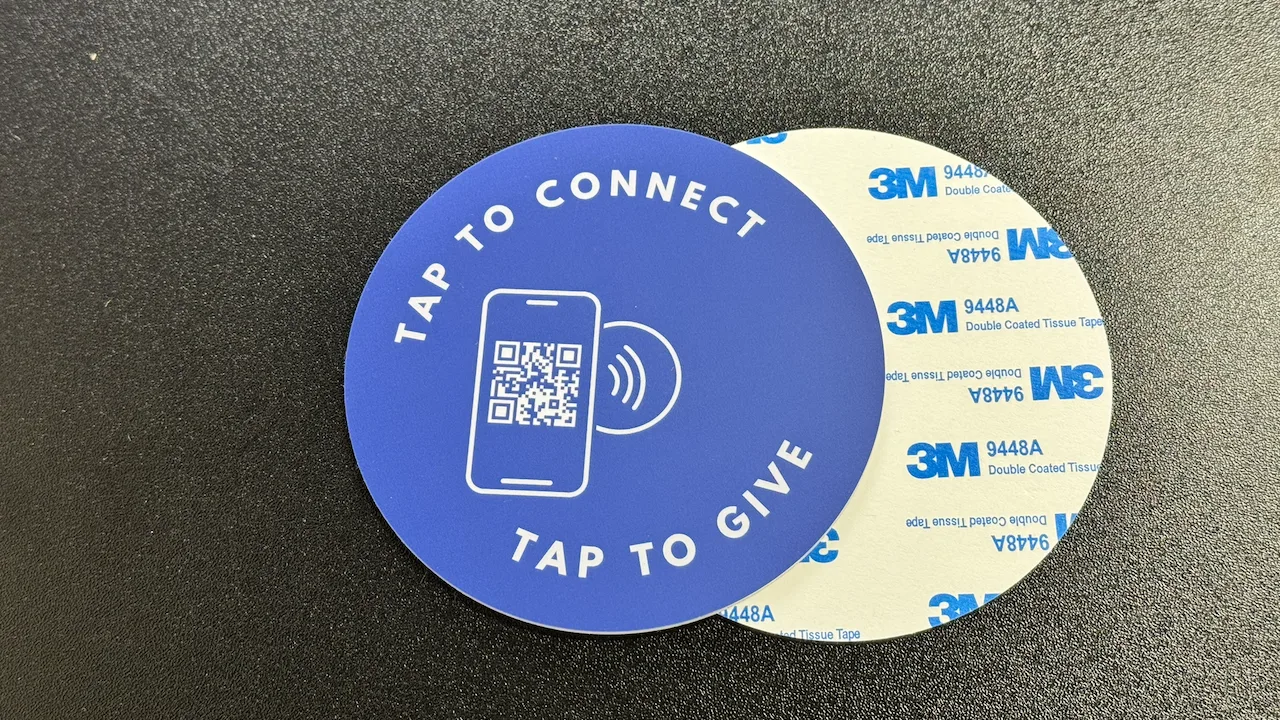
See your church's plate and price in 30 seconds
Design it yourself on the next page. From $3.50 per plate, free shipping, no monthly fees.
Why Church Digital Donations Stall
The data is consistent across every church size. The 36-point gap is built almost entirely from steps that look small on a developer’s spec but feel insurmountable in a worship service: download an app, create an account, find a giving button, type a URL on a tiny keyboard.
The donation conversion rate of a typical church giving page sits between 1% and 4%. A well-optimized one converts 8-15% of visits into completed gifts. The difference isn’t copy or design, it’s how many steps stand between landing on the page and tapping “Give.”
The fix is structural: stop putting an app between the giver and the gift. The five steps below remove the app, then sharpen everything around it.
Run a Friction Audit on Your Current Giving Path
Before you change anything, measure what you have. The audit takes 20 minutes and a fresh phone with no church apps installed.
The 5-Minute Friction Audit
- Sit in a back-row seat during a service. Don’t use any insider knowledge.
- From the moment the offering is announced, time how long it takes you to give $5 using whatever your church currently offers.
- Note every screen, tap, and pause. Flag any place you have to type more than your name or amount.
- Repeat with both an iPhone and an Android phone. Different paths often surface different bugs.
- Score the experience: under 10 seconds is good; 30-60 seconds means you’re losing most potential givers; over a minute is critical.
Most churches fail the audit at one of three spots: an app store install screen, a login wall, or a giving page that doesn’t fit the phone. Each of those is a giving platform decision masquerading as a UX detail. Track which one is killing you and the rest of this playbook addresses it.
If you’re running analytics, look at these numbers
- Mobile bounce rate on your giving page (target: under 40%)
- Donation conversion rate by device (target: 8%+ on mobile)
- Time-to-first-tap on the giving page (target: under 5 seconds)
- First-time-giver count per month (most churches don’t track this, start now)
Fix Mobile Conversion on Your Giving Page
Over 70% of online church giving happens on a phone. If your giving page wasn’t built mobile-first, you’re losing donors at the finish line, people who already decided to give but couldn’t complete the form. This is the highest-leverage fix in the playbook because it benefits every other channel: NFC, QR, text, email, social.
Mobile Giving Page Checklist
Most modern giving platforms (Tithely, Pushpay, Donorbox, Givelify, Subsplash, Anedot, Nucleus Giving) let you customize the giving page or embed a form on your own site. Use that. The default is rarely good enough.
The single biggest conversion lever
Apple Pay and Google Pay support, prominently placed. A giver who taps Apple Pay completes a gift with FaceID and one button. A giver who manually types a credit card on a phone takes 60+ seconds and frequently abandons. If your platform doesn’t support digital wallets, fix that before anything else on this list.
Add NFC Tap-to-Give Plates as the In-Service On-Ramp
A great mobile giving page only matters if people land on it during the moment they want to give. In a worship service, that moment is short, often less than 90 seconds. Asking someone to remember a URL and type it during the offering is asking them to fail.
NFC tap-to-give plates compress the in-service path to about 8 seconds total: tap the plate, enter an amount, confirm with Apple Pay or Google Pay. No app. No QR scan. No URL. The plate sits on the pew or chair in front of every seat, mounts with adhesive or screws, and works with whatever giving platform you already use.
The first-time-giver number is the one finance leaders should pay attention to. App-based giving is invisible to visitors who will never download a church-specific app for a service they’re visiting once. A plate on the pew converts those visitors, often before they’ve decided whether they’re coming back.
For full deployment specifics, artwork, mounting, placement, pulpit scripts, see our 4-week NFC rollout playbook. Tap.Giving plates run $3.50 to $5.00 each with no monthly fees and no transaction fees from us.
Centralize Next Steps With the Nucleus Launcher
The Nucleus Launcher is a free overlay button you add to your church website. It lives in the corner of every page and, when tapped, opens a panel of next-step actions: give, submit a prayer request, sign up for a group, register for an event, request baptism, fill out a connect card, and more. There’s no monthly fee, no contract, and no app. You create a free account at nucleus.church and paste a snippet into your site.
Why the Launcher pairs perfectly with NFC plates
On its own, an NFC plate opens whatever URL you encoded. If that URL is your giving page, great, giving is fast. But many givers are also looking for a prayer request, a small-group signup, or a way to take a next step. Pointing the plate at your homepage with the Launcher installed turns one tap into many possible actions, all in a familiar overlay.
For an in-depth setup walkthrough, see Nucleus Launcher + NFC Tap Plates: The Free Tap-to-Connect Setup.
Giving on the Launcher
Link the giving button to your existing giving URL on Tithely, Pushpay, Subsplash, Donorbox, Givelify, or Nucleus Giving. The Launcher opens it in the same window, no new tab, no app handoff.
Prayer + Signups
PrayerFlow, group enrollment, event registration, volunteer signup, connect cards. All free. Adds depth to a single tap on a plate without changing your giving stack.
One Tap, Many Paths
Encode plates with your church’s homepage URL. Visitors tap, the Launcher opens, and they choose where to go. Givers, prayer requesters, and group signups all start from the same plate.
$0/month, Forever
The Launcher itself costs nothing. Combined with one-time NFC plates, you get a full tap-to-connect stack with no recurring software fees, a real cost advantage over Subsplash or Tithely subscriptions.
Convert First-Time Givers Into Recurring Donors
Steps 1-4 increase the number of digital donations you receive. Step 5 increases what each one is worth. Recurring givers donate ~42% more annually than one-time givers, and the average recurring schedule stays active for 12 months once set up. Donor engagement compounds when you turn a single tap into a sustained relationship.
Send an automated thank-you
Most platforms ship this, turn it on. Keep it warm, brief, and tied to a specific impact. “Your gift helps us feed 200 families this month.”
Personal note from a pastor or staff member
Email or handwritten. Acknowledge the gift, invite them deeper into the community. This is the step nobody else does and it’s the one that converts.
Invite to set up recurring giving
Frame it as joining the team that funds the mission, not as paying the bills. A simple link to your platform’s recurring schedule page is enough.
The retention math, plainly
10 new first-time givers per month + 30% recurring conversion + $50/week average recurring gift = $93,600 in annual giving from follow-up alone. The follow-up itself is a 15-minute setup in your giving platform. Most churches skip it; the ones that don’t see giving platform adoption translate into real revenue.
Why This Beats Tithely and Subsplash App Workflows
Tithely and Subsplash are not bad platforms. Their giving forms are competent and their app ecosystems are mature. The problem is that app workflows put the worst step, app install or login, in front of the moment of intent. App-free workflows put it after. Below is what a first-time guest experiences in each path.
| Path | Steps for First-Time Giver | Time to Complete | Drop-Off Risk |
|---|---|---|---|
| NFC plate → web giving page | Tap, enter amount, Apple/Google Pay (3 steps) | ~8 seconds | Low |
| NFC plate → Nucleus Launcher → giving | Tap, choose “Give,” complete on giving page (4 steps) | ~12 seconds | Low |
| Tithely app workflow | Find app store, install, sign up, log in, navigate, give (7+ steps) | 3-5 minutes | Very high |
| Subsplash app workflow | Find church-branded Subsplash app, install, log in, navigate, give (5-7 steps) | 2-4 minutes | Very high |
| Tithely web link (app-free) | Open browser, type URL, complete (4-5 steps including typing) | 25-45 seconds | Moderate |
The point isn’t to abandon Tithely or Subsplash if you’re using them. NFC tap-to-give plates work with both, encode the plate with your Tithely web giving URL or your Subsplash giving form and skip the app entirely. The plate becomes the on-ramp; the platform handles the processing.
For a complete platform-by-platform comparison of cost and friction, see our 2026 best online giving platforms guide.
Ready to lift digital donations without forcing an app on anyone?
Pair NFC tap-to-give plates ($3.50 to $5.00 each, one-time) with the free Nucleus Launcher. Zero monthly cost, full app-free coverage, and a 3-second giving path on every seat.
Start a quote to get 10% off for 7 days
FAQ: App-Free Church Digital Donations
How do I increase church digital donations without forcing people to download an app?
Remove the app from the path entirely. Use a web-based giving page that opens directly on a phone, surface it during the offering with NFC tap-to-give plates on every seat, and link to it through a free overlay like the Nucleus Launcher on your website. App-free workflows reduce drop-off because they skip the install, signup, and login steps that kill first-time-giver conversion.
What’s a realistic donation conversion rate for a church giving page?
A well-optimized mobile giving page should convert 8-15% of visits into completed gifts. Pages that require login or app install before giving routinely drop below 2%. The biggest levers are page speed (under 3 seconds on 4G), Apple Pay/Google Pay support, and visible give buttons above the fold.
Do NFC tap-to-give plates work without the giver downloading anything?
Yes. NFC plates push a URL to the phone’s existing browser. There is no app on the giver’s side and no app on the church’s side. Modern iPhones (XS or newer) and virtually every modern Android phone read NFC out of the box.
How does the Nucleus Launcher fit into a church’s digital giving strategy?
The Nucleus Launcher is a free overlay button you add to your church website. It opens a panel with quick links to giving, prayer requests, signups, and other next steps. It pairs naturally with NFC tap-to-give plates: the plate opens the website, the Launcher centralizes giving and other actions in one tap, and there is no monthly cost for either piece.
Is app-free giving actually faster than Tithely or Subsplash app workflows?
For first-time givers, yes, dramatically. A native app workflow requires download, signup, login, and navigation before any gift can be made. An app-free path (NFC tap or web link to a mobile-optimized giving page) lets a first-time giver complete a donation in under 10 seconds. For repeat givers who already have the app installed and logged in, native apps are competitive but rarely faster than a tap.
Related Articles
How to Boost Church Giving With NFC Donation Plates
A practical 4-week deployment plan, setup, placement, and pulpit scripts, for using NFC donation plates to lift in-service participation.
GuideNucleus Launcher + NFC Tap Plates: The Free Tap-to-Connect Setup
The Nucleus Launcher is free. Tap.Giving plates are a one-time cost. Together you get a $0/month tap-to-connect stack.
StrategyChurch Giving Without an App: Why the Simplest Option Wins
Every app-free giving method ranked by friction. See why NFC tap-to-give outperforms QR codes, text-to-give, and kiosks.