Nucleus Launcher + NFC Tap Plates: The Free Tap-to-Connect Setup for Churches
The Nucleus Launcher is a free plugin that puts all your church’s next steps in one place, giving, prayer, signups, events, groups, and more. Pair it with NFC tap plates from Tap.Giving and you get a complete tap-to-connect solution for $0/month ongoing. No app. No subscription. No strings.
See your church's plate and price in 30 seconds
Design it yourself on the next page. From $3.50 per plate, free shipping, no monthly fees.
1. What Is the Nucleus Launcher?
The Nucleus Launcher is a free tool from Nucleus that gives every church a central hub for connection, right on their website. It’s a small button that lives in the corner of every page. When someone taps it, an overlay opens with all the ways they can take their next step: give, submit a prayer request, sign up for a group, register for an event, volunteer, request baptism, fill out a connect card, and more.
The important part: the Launcher is completely free. No subscription. No credit card required. No trial period. It’s Nucleus’s gift to every church, regardless of size. You create a free account at nucleus.church and you’re up and running.
Giving
Link to your giving page, whether that’s Nucleus Giving, Tithely, Pushpay, Donorbox, or any other platform.
Prayer Requests
PrayerFlow lets members submit prayer requests right from the Launcher, during the service or anytime.
Groups & Signups
Small group enrollment, volunteer registration, connect cards, event signups, all in one place.
Events
Event registration flows directly inside the Launcher. No separate sign-up page needed.
Baptism & Next Steps
Baptism requests, membership inquiries, and other next-step forms, all accessible with one tap.
Custom Branding
Match your church’s colors, icons, and messaging. The Launcher looks like part of your site, not a third-party widget.
The Launcher works on any website builder, WordPress, Squarespace, Wix, Weebly, Subsplash, and more. It installs with a simple embed code pasted into your site’s header. And beyond the on-site button, Nucleus gives you a custom Launcher URL, a shareable link you can use in emails, social media, your link-in-bio, text messages, and (most relevant to this guide) your NFC tap plates.
Free Means Free
To be clear: the Nucleus Launcher is not a free trial. It is not a freemium hook. It is a genuinely free product with no time limit and no credit card required. Nucleus does offer a paid giving add-on (Nucleus Giving at $49/mo with the lowest processing fees in church tech), but the Launcher itself, with prayer, signups, events, groups, connect cards, and more, costs nothing. Create your account at nucleus.church.
2. What Happens When Someone Taps a Plate
Understanding the experience from the congregant’s perspective is the best way to explain it to your team and your church. Here’s exactly what happens, step by step.
Person Sees the NFC Plate
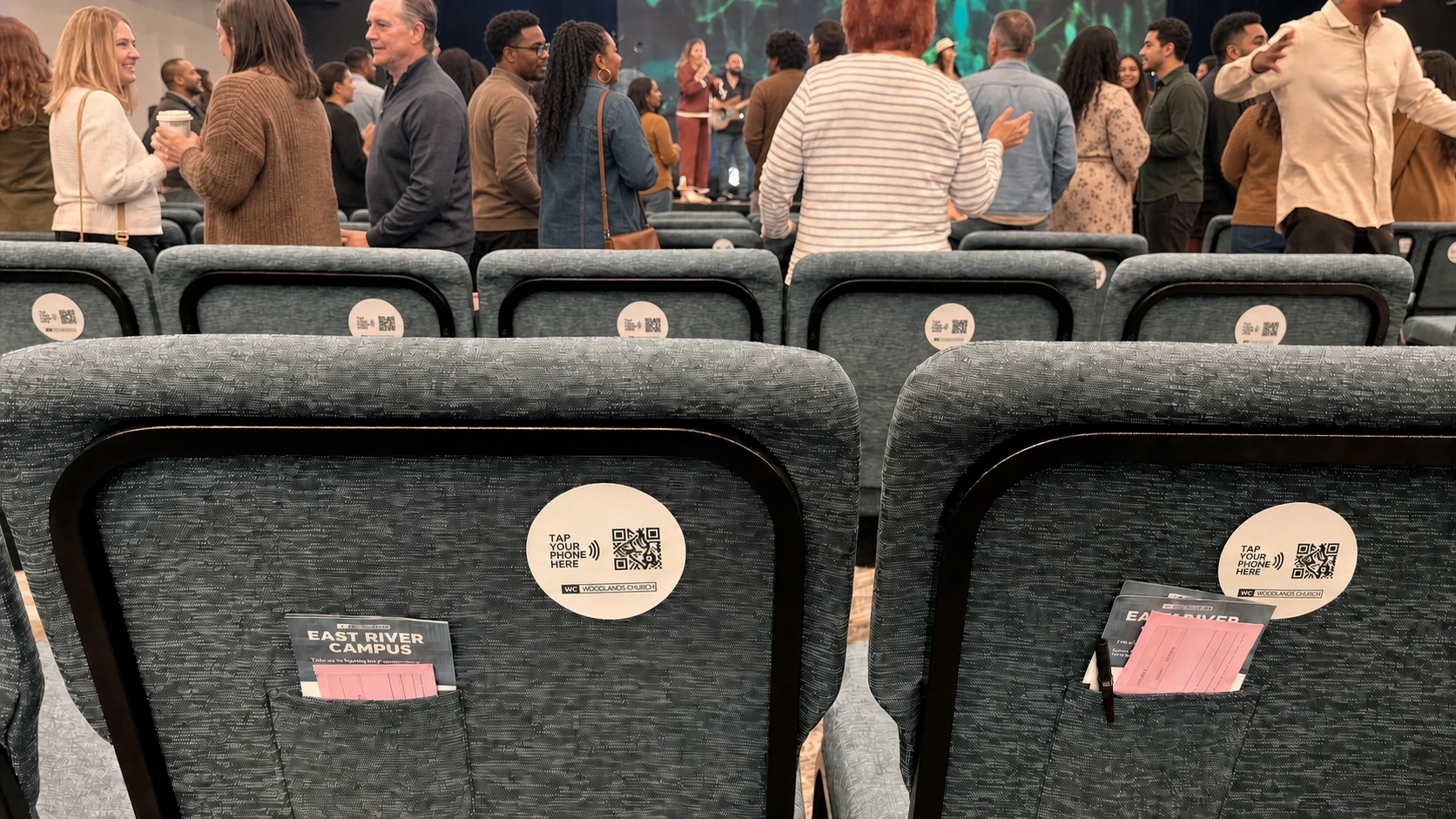
A small, custom-branded plate is mounted on the chair back, pew, welcome table, or lobby wall. It’s visible, clean, and clearly part of the church’s setup.
They Tap Their Phone to the Plate
No app to download. No QR code to scan. No URL to type. They hold the top of their phone near the plate and the NFC chip does the rest. On iPhone, a small notification appears, one tap opens it. On most Android devices, the browser launches directly.
The Nucleus Launcher Opens
The phone’s browser opens the Launcher URL. In about one second, they see your church’s branded Launcher page with all available next steps, giving, prayer, signups, events, groups, connect cards, and whatever else you’ve configured.
They Choose What They Want to Do
This is the key difference from a “tap to give” setup. The Launcher isn’t just a giving page, it’s a connection hub. The person decides what’s right for them in that moment: give a donation, submit a prayer request, sign up for a small group, register for an event, volunteer, request baptism, or fill out a connect card.
Done. No Account Required.
The visitor doesn’t need to create a Nucleus account. They don’t need to download an app. Everything works in the phone’s default browser. The entire experience, from tap to completion, takes under 30 seconds.
Tap to Connect, Not Just Tap to Give
Most NFC church setups open a single giving page. The Nucleus Launcher opens everything. That’s why we call this a “tap to connect” setup rather than just “tap to give.” A first-time visitor might not be ready to give, but they’ll gladly tap to fill out a connect card or submit a prayer request. Every plate becomes a universal connection point for your church.
3. Why This Is the Cheapest Tap-to-Connect Setup
Let’s talk numbers. When you combine a free Nucleus Launcher with one-time NFC plates from Tap.Giving, the math speaks for itself.
Nucleus Launcher
Free forever. No credit card. No trial. Create an account and go.
Per Plate (One-Time)
100 plates = $500. 200 plates = $800. 400+ plates = $3.50 each. Free shipping.
Ongoing Cost
No monthly fees from Nucleus. No monthly fees from Tap.Giving. No transaction fees from us.
That’s the whole story for the core tap-to-connect setup. A church with 200 seats invests $800 once and pays $0/month going forward. The Launcher handles prayer, signups, events, groups, connect cards, and giving links, all for free.
How It Compares
| Solution | Monthly Cost | Hardware Cost | NFC Included? | More Than Giving? |
|---|---|---|---|---|
| Nucleus Launcher + Tap.Giving | $0/mo | $3.50 to $5.00/plate | Yes | Yes |
| Overflow Tap | $208 to $833/mo | Included (discs) | Yes | Giving only |
| Subsplash Tap | Varies (platform fee) | Add-on cost | Yes | Giving only |
| Giving Kiosks | Varies | $1,500 to $5,000+ | No | Giving only |
Want Online Giving Too? Add Nucleus Giving for $49/mo
If your church doesn’t have an existing giving platform, or if you want the lowest processing fees in church tech, you can add Nucleus Giving for $49/month. It processes credit and debit cards at 1.9% (no per-transaction fee) and bank/ACH transfers at just $0.25 flat. Those are significantly lower than the industry-standard 2.9% + $0.30.
But here’s the point: Nucleus Giving is optional. The free Launcher works with any giving link you already have. If your church uses Tithely, Pushpay, Donorbox, Givelify, or any other platform, you simply add that giving URL as the giving option in the Launcher. No switching required.
The Bottom Line
A church with 200 seats can have a fully operational tap-to-connect system, giving, prayer, signups, events, groups, and connect cards, for a one-time investment of $800 and $0/month ongoing. Add Nucleus Giving if you want the lowest processing fees. Keep your existing platform if you don’t. Either way, the Launcher is free and the plates are a one-time purchase.
4. Setting Up Your Launcher for NFC
Getting your Nucleus Launcher ready for NFC plates takes about 15 minutes. Here’s the step-by-step.
Create a Free Account at nucleus.church
Go to nucleus.church and sign up. No credit card required. You’ll enter your church name, your name, and an email address. That’s it.
Customize Your Launcher Branding
In your Nucleus dashboard, set your church’s colors, logo, and icon. Choose the messaging for each button. The Launcher should look and feel like an extension of your church’s brand, not a generic tool.
Add Your Next Steps
Configure the options you want people to see when they tap a plate: giving link (your existing platform or Nucleus Giving), prayer requests, event signups, small group enrollment, volunteer registration, baptism requests, connect cards, whatever is relevant for your church.
Get Your Launcher URL
Nucleus generates a shareable Launcher link, a standalone URL that opens your fully branded Launcher in any mobile browser. This is the URL you’ll program into your NFC plates. Copy it and save it somewhere safe.
That URL Goes on Your Plates
Whether you order pre-programmed plates from Tap.Giving or program blank tags yourself, this Launcher URL is what gets written to the NFC chip. Every plate in your building will open the same Launcher, one universal connection point for everything.
Optional: Install the Launcher on Your Website Too
The NFC plates work with the standalone Launcher URL, you don’t need the Launcher installed on your website for the plates to function. But if you do install the Launcher on your site (a simple embed code in your header), you get the added benefit of the persistent Launcher button on every page of your website. Visitors who find you online get the same connection hub that people in your building get through the plates.
5. Getting Your NFC Plates
You have two options for getting NFC plates programmed with your Launcher URL. Most churches go with Option A for the professional result, but Option B is a great way to test the concept first.
Order from Tap.Giving
Send us your Launcher URL and your church logo. We handle everything:
- Custom branded plates with your church identity
- Pre-programmed with your exact Launcher URL
- Durable PVC plates (not flimsy stickers)
- Adhesive back + optional screw holes
- Free shipping, delivery 2-3 weeks from artwork approval
Pricing:
$5.00/plate (100-199) • $4.00/plate (200-399) • $3.50/plate (400+)
No monthly fees. No transaction fees from us. Ever.
Program Blank NFC Tags Yourself
Great for testing before placing a full order. Buy blank tags and program them with a free app:
- 1. Purchase NTAG215 or NTAG216 NFC tags (available on Amazon for $0.30 to $1.00 each)
- 2. Download the free NFC Tools app (iOS or Android)
- 3. Open the app, tap “Write,” select “URL,” and paste your Launcher URL
- 4. Hold the tag to the back of your phone to write the URL
- 5. Test with a different phone to confirm it opens your Launcher
Keep in mind:
Blank sticker tags look less professional and wear out faster than rigid PVC plates. Great for testing; less ideal for permanent installation on pews.
Test Before You Scale
Before ordering plates for every seat, grab a few blank NFC stickers and program them with your Launcher URL. Test on multiple phones (iPhone and Android), try different phone cases, and walk through the full experience. Once you’re confident, place your full order with Tap.Giving. We’ll even send you a free sample plate if you reach out.
6. Where to Place Plates
Because the Launcher shows all your church’s next steps, you only need one type of plate. Every plate is a universal connection point. That said, placement still matters, the right location catches people at the right moment.
Chair & Pew Backs
Best for: Giving + prayer during the offering moment
The primary location. Mount plates at eye level on the back of the seat in front of each person. During the offering, the plate is right there, within arm’s reach. This is where the majority of taps happen.
Welcome Center
Best for: First-time visitor connect cards
Visitors pass through here first. A plate at the welcome table gives them a no-pressure way to fill out a connect card, submit a prayer request, or sign up for the next newcomer event, without having to ask anyone.
Lobby & Cafe Tables
Best for: Groups, events, and giving before/after service
People linger before and after services with their phones out. A plate on the coffee bar catches the post-sermon “I should sign up for that group” impulse before they walk out the door.
Kids & Youth Areas
Best for: Youth-specific signups and volunteer registration
Parents at pickup are grateful and emotionally connected to the ministry. A plate at check-in lets them sign up to volunteer, register for the next youth event, or give, right when the impulse is strongest.
Event Tables
Best for: Event-specific registration
Conferences, VBS, mission trips, community dinners, any event where people are already engaged. They tap the plate and the event registration is right there in the Launcher.
Exit Doors
Best for: Last-chance giving and next-step commitments
A plate near the exit catches people who intended to give or sign up but didn’t get to it during the service. It’s the last touchpoint before they leave the building.
One Plate, Every Purpose
Because the Launcher shows all next steps in one place, you don’t need different plates for different purposes. The same plate that opens giving also opens prayer requests, group signups, event registration, and connect cards. Order one design, place it everywhere, and let each person choose what’s right for them. Simpler for your team. Simpler for your budget.
7. Beyond Giving: What Churches Are Using This For
This is the part that gets me most excited as a pastor. Yes, the giving angle is important, it’s why most churches look into NFC in the first place. But when you pair tap plates with the Nucleus Launcher, you unlock a connection tool that goes far beyond donations. Here’s what churches are doing with it.
First-Time Visitor Connection
A visitor taps the plate and fills out a digital connect card, right from their seat. No paper. No pen. No awkward clipboard passing. The church gets their info instantly.
Prayer Requests During Service
When the pastor says “If you have a prayer request, let us know,” people can tap the plate and submit one immediately through PrayerFlow. Private, instant, and the prayer team sees it in real time.
Small Group Signup
The pastor announces a new small group season. People tap the plate and browse available groups right there in the Launcher. By the time they leave the building, they’re enrolled.
Event Registration
Upcoming retreat? VBS? Community dinner? When the event is announced from the stage, people tap and register before the moment passes. No “I’ll sign up later” that never happens.
Volunteer Signup
Need more greeters? Sound techs? Kids’ ministry workers? The volunteer signup lives in the Launcher. When you make the ask from the stage, the response path is one tap away.
Baptism Requests
After a baptism Sunday or an altar call, someone feels moved to take their next step. They tap the plate and submit a baptism request. No waiting in line. No filling out a card they might lose.
The Real Value
Every Sunday, people sit in your chairs with good intentions they never act on. They mean to fill out a connect card. They plan to sign up for that group. They want to give but don’t have cash. The Nucleus Launcher + NFC plates put every next step one tap away. That’s not just a giving tool, it’s a discipleship accelerator.
8. Announcing It to Your Congregation
How you introduce the plates matters. The key is to emphasize that they’re about more than just giving, they’re a way to connect with everything your church offers. Here’s how to launch well.
Sample 20-Second Pulpit Announcement
“You may have noticed the new plates on the [pews/chairs] in front of you. Here’s what they do: hold the top of your phone near the plate, and it opens a page with everything you might need, giving, prayer requests, group signups, event registration, and more. No app to download. No account to create. Just tap and connect. Try it right now, even if you’re just curious. Our ushers can help if you have any questions.”
~20 seconds to read. Notice the emphasis on “more than giving”, this frames the plates as a connection tool, not a fundraising device.
First Sunday Rollout Tips
Brief the Ushers and Greeters First
Before the service, walk every usher and greeter through the tap process. Let them practice on a plate. If they can do it confidently, your congregation will feel comfortable trying it.
Show a Quick Demo on Screen
A 15-second video or a few slides showing someone tapping their phone to the plate is worth a thousand words. Show the plate, show the tap, show the Launcher opening with all the options.
Invite Everyone to Try It, No Pressure
Say: “Try tapping your phone to see how it works. You don’t have to do anything, just see what pops up.” Removing pressure lets curious people experience the technology. Once they see how easy it is, they’ll come back to it.
Mention It for Three Consecutive Weeks
People don’t adopt new things after hearing about them once. A brief mention each week for three weeks builds familiarity. By week four, the plates are just part of the normal experience.
Explaining It to Older Members
Some members may be unfamiliar with NFC or hesitant about new technology. Keep the explanation simple: “Hold your phone near the plate and it opens a page on your phone. You don’t need to download anything.” Don’t use the term “NFC”, just say “tap your phone.” If their phone is too old for NFC, your plates can include a QR code backup they can scan with their camera instead.
9. Troubleshooting
Most issues are easy to resolve. Here are the questions we hear most often and the fixes for each.
“The tap didn’t work.”
Three things to check, in order:
- Is NFC enabled? On iPhone (XR and newer), NFC is always on, no setting to change. On Android, go to Settings > Connected devices > Connection preferences > NFC and toggle it on.
- Are they tapping the right part of the phone? The NFC antenna is in the top half of most phones. Hold the top of the phone near the center of the plate.
- Is the phone case blocking the signal? Thick wallet cases, metal cases, and magnetic car-mount accessories can block NFC. Try without the case.
“Can visitors use the Launcher without creating an account?”
Yes. Visitors do not need a Nucleus account, do not need to download an app, and do not need to log in. They tap the plate, the Launcher opens in their phone’s browser, and they can give, submit a prayer request, sign up for a group, or take any other next step. Everything works as a guest.
“Does my church need a Nucleus website for this to work?”
No. The Nucleus Launcher works on any website, WordPress, Squarespace, Wix, Weebly, Subsplash, or any other builder. You do not need a Nucleus-built website.
For NFC plates specifically, you use the standalone Launcher URL (a shareable link), which works completely independently of your website. Your church website doesn’t even need the Launcher installed for the plates to function, though installing it gives your online visitors the same experience.
“What if someone’s phone doesn’t support NFC?”
All iPhones from the XR (2018) onward and nearly all Android phones manufactured after 2018 support NFC. For the small percentage that don’t, you have a simple backup:
Ask Tap.Giving to include a QR code on your plate design. The QR code points to the same Launcher URL. If someone’s phone can’t read NFC, they open their camera, scan the QR code, and land on the same Launcher. Every person in your congregation can connect, regardless of their device.
“Can I still use my existing giving platform?”
Absolutely. The Nucleus Launcher is platform-agnostic. You can add your Tithely, Pushpay, Donorbox, Givelify, or any other giving link as the giving option in the Launcher. The Launcher simply centralizes all your church’s next steps, it does not replace your existing tools. If you ever want to switch to Nucleus Giving for lower processing fees, you can do that later. But there’s no pressure and no requirement.
Ready to Add Tap-to-Connect to Your Church?
Custom branded NFC plates, pre-programmed with your Nucleus Launcher URL. Starting at $3.50/plate. No monthly fees. No transaction fees from us. Free shipping.
Start a quote to get 10% off for 7 days.
Related Articles
Nucleus Tap-to-Give Setup: Quick 3-Step Guide
Need just the basics? Get NFC giving running with Nucleus in three simple steps, no deep dive required.
Best Practices7 Ways to Increase In-Service Giving Without Being Pushy
Practical strategies for boosting donations during worship without guilt trips or awkward moments.
StrategyWhy Church Visitors Don’t Give (And How to Change That)
The hidden barriers that stop first-time guests from giving, and the simple fixes that remove them.