Pushpay Cost vs Tap.Giving: 5-Year Math (2026)
Pushpay does not publish its prices; it quotes each church after a sales call. Churches report paying roughly $199 a month for giving on its own, $500 to $800 a month once the branded app is added, and $1,000 to $1,500 or more a month for the full giving, app, and church management bundle, plus 2.9% + $0.30 per card gift and no required setup fee. Over five years that full bundle runs a 200-seat church about $88,500 before transaction fees. Tap.Giving NFC tap plates are a one-time $800 purchase that work with whatever giving page your church already has. Here is the honest math, the feature trade-offs, and when each one wins.
$87,700
Saved over 5 years by a 200-seat church that uses NFC tap plates plus a low-cost giving platform instead of Pushpay’s full giving, app, and CCB bundle
See your church's plate and price in 30 seconds
Design it yourself on the next page. From $3.50 per plate, free shipping, no monthly fees.
Pushpay and Tap.Giving Are Different Products
Before any cost math is honest, you have to be honest about what you are comparing. Pushpay is an all-in-one church software platform. It handles giving, donor management, a branded church app, communication tools, and (with the Church Community Builder acquisition) church management. The pitch is one vendor for everything.
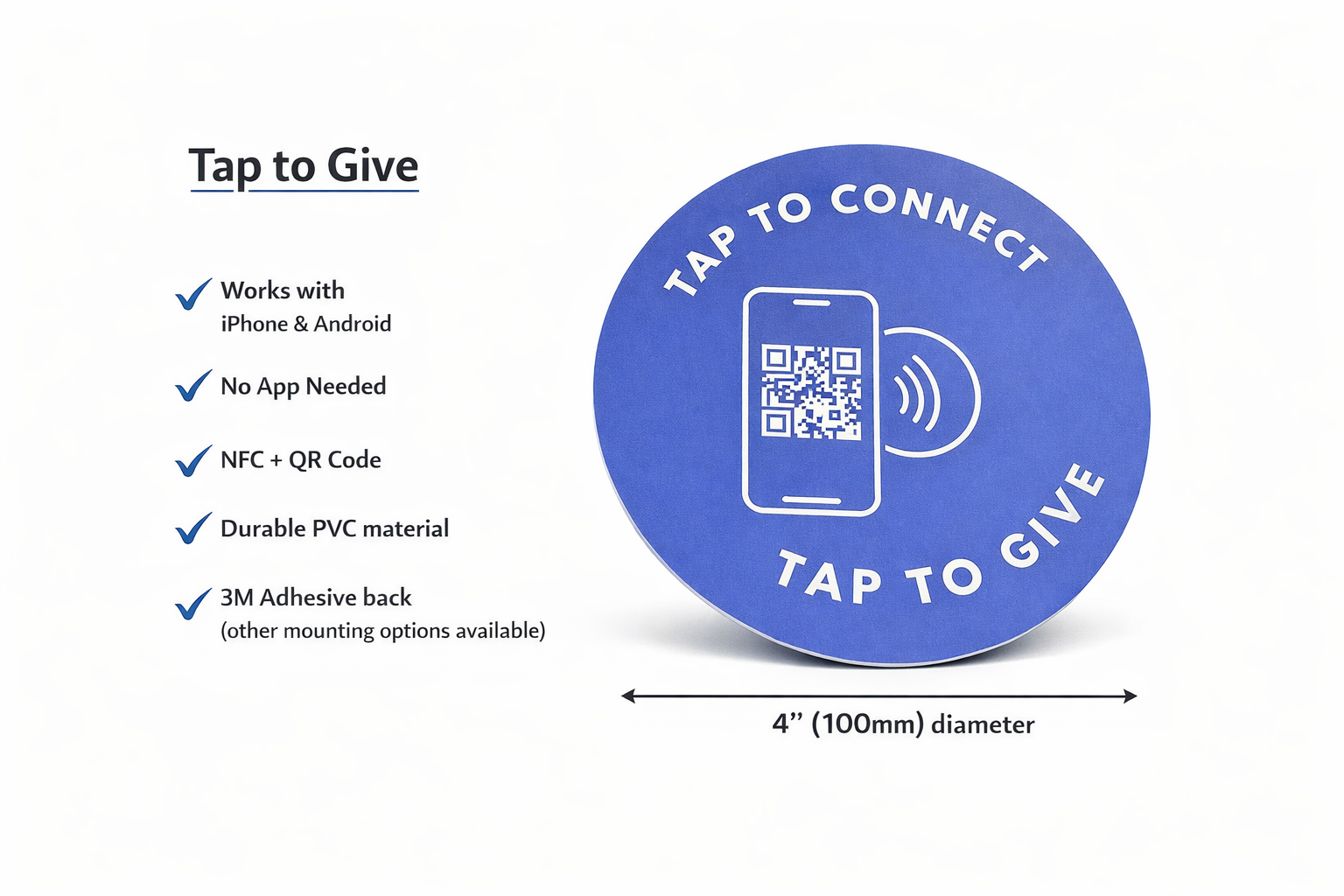
Tap.Giving sells hardware. Specifically, NFC tap plates that a church mounts on pew backs or chair backs. Someone taps a phone on the plate, the phone opens your existing giving page, and a donation happens through whatever giving platform you already use. We are not a payment processor and we are not a church management system.
So the real question a pastor is asking when they put these side by side is: do we need an all-in-one platform, or would a low-cost giving platform plus contactless church collection plate hardware do the job for a fraction of the price? For a large multi-site with a serious app strategy, the answer might be Pushpay. For most churches in the 100 to 600-seat range, the answer turns out to be plates plus a low-cost giving platform like Tithely’s free tier, Anedot, or Planning Center Giving.
The two are not mutually exclusive. Churches happily run plates with Pushpay if they already love the platform. The plates simply move the giving moment into the service, which is where first-time givers are most likely to act. This is one of the reasons NFC giving converts fewer steps than a QR code in side-by-side tests, according to data we cover in our QR vs NFC comparison.
What Pushpay Actually Costs in 2026
Pushpay does not publish pricing on its website. Its pricing page lists three tiers (Core, Advanced, Complete) and asks you to book a demo for the numbers. It quotes per church based on size, modules, and bundle. The clearest way to read the cost is by what you bundle: churches report paying roughly $199 per month for giving on its own, $500 to $800 per month once the branded app is added, and $1,000 to $1,500 or more per month for the full giving plus app plus church management (CCB) bundle. The numbers below come from public church-tech reviews and quotes customers have shared online. Use them as a directional estimate, not gospel, and ask Pushpay for a written quote before you decide.
| Cost line | Typical range (2026) | Notes |
|---|---|---|
| Setup fee | $0 required | Pushpay states there is no required setup fee; optional onboarding or coaching is reported at $1,000 to $3,000 |
| Monthly platform fee | ~$199 to $1,500+ | By bundle: giving only ~$199, plus the app ~$500 to $800, plus app and CCB ~$1,000 to $1,500+. Pushpay offers 1, 2, and 3-year contracts |
| Processing fee | 2.9% + $0.30 per card gift | Comparable to Stripe-based platforms; ACH is reported cheaper |
| VisitorTap NFC discs | Bundled (cost varies) | Pushpay’s in-house NFC option, smaller than tap plates |
| Annual total (subscription only) | ~$2,400 to $18,000+ | By bundle tier, before transaction fees |
For the 5-year comparison below, we model a church running the full Pushpay stack, giving plus the branded app plus CCB, at $1,475 per month. That is the top tier above, so it is the most demanding case for our column, not the cheapest. A church that only uses the giving form pays far less, but as the next section shows, even the entry tier costs more in one year than tap plates cost once. If your quote is lower, adjust the math down. The transaction fee column is roughly the same on every platform a Stripe-style processor underwrites, so it largely cancels out. The real spread is the platform subscription itself.
For the full tier-by-tier breakdown of what churches report paying, see how much Pushpay costs in 2026. If you are weighing Pushpay against a genuinely free platform, see our Pushpay vs Zeffy fee comparison. For a deeper look at the Pushpay-bundled NFC option, see our VisitorTap vs Tap.Giving comparison. For Pushpay’s integration setup steps, see how to add tap to donate to a Pushpay-powered church.
5-Year Total Cost: Pushpay vs Tap.Giving
The scenario: a 200-seat church evaluating whether to renew Pushpay or to add NFC tap plates to a low-cost giving platform. We hold the transaction fee column equal because both paths use the same kind of processor underneath. The only meaningful spread is platform subscription versus hardware. We model the full giving-plus-app-plus-CCB tier, the church actually weighing whether it needs everything Pushpay does, and we honor Pushpay’s stated no-required-setup-fee policy rather than padding its column. A church on a lower tier pays less per month, but as the numbers show, even the entry tier clears the entire five-year plate cost in a single year.
| Cost line (200-seat church) | Pushpay (full bundle) | Tap.Giving + Tithely Free |
|---|---|---|
| Setup / hardware | $0 required (optional onboarding extra) | $800 (200 plates × $4.00, one-time) |
| Year 1 platform fee | $17,700 ($1,475 × 12) | $0 (Tithely free tier) |
| Years 2-5 platform fees | $70,800 ($17,700 × 4) | $0 |
| Transaction fees (5 years) | Same as right column | 2.9% + $0.30 (processor) |
| 5-year platform spend | ~$88,500 | $800 |
| Net savings | baseline | ~$87,700 |
Even if you cut Pushpay’s monthly number in half, the comparison still ends with tens of thousands of dollars left on the table. The structural reason is that Pushpay is a recurring subscription and Tap.Giving is a one-time purchase. Time is on the hardware’s side. For a more general look at the recurring-versus-one-time math across the category, see our analysis of hidden costs across church giving platforms.
A 400-seat church running the same math saves more, because the plate cost-per-seat drops to $3.50 and the subscription line keeps climbing. A 100-seat church saves less in absolute dollars, but the percentage savings is roughly the same. See our pricing page for plate cost at every quantity.
Feature Matrix: Where Each One Wins
Cost is half the picture. The other half is whether you actually use what you are paying for. Here is an honest side-by-side on the features pastors ask about most when comparing church giving technology.
| Feature | Pushpay | Tap.Giving plates (+ giving platform) |
|---|---|---|
| In-service NFC tap to give | VisitorTap discs (bundled) | Branded 4-inch tap plates |
| Mobile giving page | Yes (Pushpay-hosted) | Yes (whatever platform you use) |
| Recurring giving | Yes | Yes (handled by platform) |
| Donor management / CRM | Strong (especially with CCB) | Depends on platform |
| Branded church app | Yes | No (plates open a browser, no app needed) |
| Works with your current platform | No (Pushpay is the platform) | Yes (Tithely, Pushpay, Subsplash, Donorbox, Givelify, Anedot, Planning Center, more) |
| Monthly fee | ~$199 to $1,500+ by tier | $0 from us |
| Contract | Yes (1, 2, or 3-year terms) | None (one-time purchase) |
| Time to first donation | 2-6 weeks (onboarding) | 2-3 weeks (plate production + mount) |
Pushpay’s real strength is the integrated donor data and the branded app. If your staff lives in the donor profile screen and pastoral care is wired into the same record, that is genuine value. If nobody on staff has logged into the donor management module in 90 days, you are buying features you are not using. We dig into the app-versus-no-app question in church giving without an app.
When to Pick Pushpay Anyway
The honest carve-out. Pushpay is a real product with real strengths, and there are churches it fits. You should keep or pick Pushpay if all of the following are true:
- You actively use the donor management workflows (notes on records, pastoral assignments, follow-up reminders).
- Your church app has more than 25% household adoption and people actually open it.
- Multiple staff members log in weekly to a Pushpay module besides the giving form.
- You are part of a network that has standardized on Pushpay across campuses.
- The cost is approved in your budget without anyone wincing at renewal time.
If those are all true, keep Pushpay. You can still add Tap.Giving plates as the in-service hardware on top, encode them with your Pushpay giving URL, and let people tap and give right from the pew. The plates work with Pushpay the same way they work with anything else.
When to Add Tap.Giving Plates Instead
Add NFC tap plates and skip (or downgrade) Pushpay if any of these are true. Most churches we talk to recognize themselves in two or three of these.
- You are paying for Pushpay but only using the giving form day to day.
- Your in-service giving has dropped since the offering tray went away during COVID, and online giving has not closed the gap.
- You are a small to mid-sized church and the platform subscription is the third- or fourth-largest line in the budget.
- You want digital giving for churches without locking in to one vendor.
- You like the idea of a one-time hardware purchase rather than a recurring SaaS line.
For the small-church variant of this decision, see NFC giving for small churches. For the ROI side of the math, see NFC giving ROI by the numbers. To see how plates fit into a full platform comparison, see our tap-to-give platform comparison.
Two more practical notes. Those are big numbers, but they only happen if the giving moment is in front of the giver. A platform alone cannot do that. Hardware in the pew can. Second, the plates work with whatever you already use. Switching is a separate decision you can make later.
Ready to add tap to give without adding a subscription?
One-time hardware. No monthly fees. Works with Pushpay, Tithely, Subsplash, Donorbox, Givelify, Anedot, and Planning Center Giving. Most churches are tapping by week four.
Start a quote to get 10% off for 7 days
FAQ: Pushpay vs Tap.Giving
How much does Pushpay actually cost per month?
Pushpay does not publish exact pricing on their website. Based on public church-tech reviews and customer quotes, churches report roughly $199 per month for giving only, $500 to $800 per month once the branded app is added, and $1,000 to $1,500 or more per month for the full giving plus app plus church management bundle, with processing fees of 2.9% plus $0.30 per card transaction. Pushpay states there is no required setup fee, and 1, 2, and 3-year contracts are standard. Even the entry tier runs about $2,400 a year, more than tap plates cost once.
Does Pushpay charge transaction fees?
Pushpay does not publish its processing rates, but churches report about 2.9% plus $0.30 per card gift, with ACH bank transfers lower. That per-gift fee sits on top of the monthly platform subscription, so a church on Pushpay pays twice: a recurring plan fee and a cut of every donation. Tap.Giving charges no platform fee and takes no cut of any gift. The plates open the giving page your church already uses, so the only processing fee you pay is whatever that platform already charges. When you compare the all-in cost, the number that matters is not just Pushpay’s percentage, it is the subscription stacked on top of it.
Is Tap.Giving a replacement for Pushpay?
No. Pushpay is an all-in-one church platform that handles giving, donor management, and a church app. Tap.Giving sells NFC tap plates, which are hardware only. The plates open whatever giving page your church already uses, including Pushpay if you keep it. Most churches that compare the two are deciding whether they need Pushpay’s full software stack, or whether a low-cost giving platform plus NFC tap plates will do the job for far less money.
Does Pushpay have NFC tap-to-give?
Pushpay added VisitorTap in 2024, which is a small NFC disc that opens a giving page. It is bundled with the Pushpay platform subscription, so the cost is the monthly fee plus the discs. Tap.Giving plates are larger, branded, work with any giving platform, and are a one-time purchase starting at $3.50 per plate.
Can a church use Pushpay and Tap.Giving together?
Yes, and many do. The plates encode your Pushpay giving URL and open it when someone taps. Pushpay handles the donation, the receipt, and the donor record exactly as it does for any other digital donation. The plates simply move the giving moment back into the service, which is when first-time givers are most likely to act.
What giving platform should we use if we leave Pushpay?
For small to mid-sized churches, the Tithely free tier (no monthly fee, 2.9% plus $0.30) or Anedot’s free plan (3.3% plus $0.30, no monthly fee) cover the basics. Planning Center Giving is a strong fit for churches already on Planning Center. Donorbox works for churches that want a hosted form. We have detailed pricing breakdowns for Tithely, Subsplash, and Stripe-based options.
How fast can a church switch from Pushpay to plates plus a low-cost platform?
About three to four weeks end to end. Week one: set up the new giving platform, confirm the mobile URL, and order plates (2 to 3 weeks for delivery). Weeks three to four: mount and announce. The trickier piece is exporting donor history and recurring schedules from Pushpay, which their support team can help with. Time the switch outside year-end if possible.
When does Pushpay still make sense?
Pushpay is a fit if your church genuinely uses the full platform: the branded app, the donor management workflows, the campaigns module, and the integrated ChMS. If you are paying $1,475 a month and only using the giving form, you are overpaying. Audit which features are actually used by staff before you renew.
Related Articles
VisitorTap vs Tap.Giving
Pushpay’s NFC discs versus our branded 4-inch tap plates. Size, cost, and platform lock-in compared head-to-head.
ComparisonTithely vs Tap.Giving
The other big SaaS giving platform compared to a one-time NFC plate purchase. Full 5-year cost math inside.
GuideHidden Costs of Church Giving Platforms
Setup fees, contract minimums, processor markups, and the line items churches miss in pricing comparisons.