Givelify vs Tap.Giving: App vs NFC Plates (2026)
Givelify is a free giving app. Tap.Giving sells $3.50 to $5.00 NFC tap plates that work with whatever giving page your church already uses, Givelify included. Both run the same 2.9% plus $0.30 processing. The real difference is whether giving happens in the service or after it.
Is Givelify or Tap.Giving Right for My Church?
Givelify alone is enough for some churches: if in-service giving is already healthy, your donor base prefers giving from home, your church does not have a regular in-person service rhythm, or you are an early-stage plant with no hardware budget. Otherwise, Givelify and Tap.Giving do different jobs. Givelify is the giving platform and dashboard; Tap.Giving is the hardware that puts a giving moment inside the service. A tap opens your existing Givelify page and the gift completes in about eight seconds. We are not a payment processor; the church keeps Givelify underneath.
In the seat
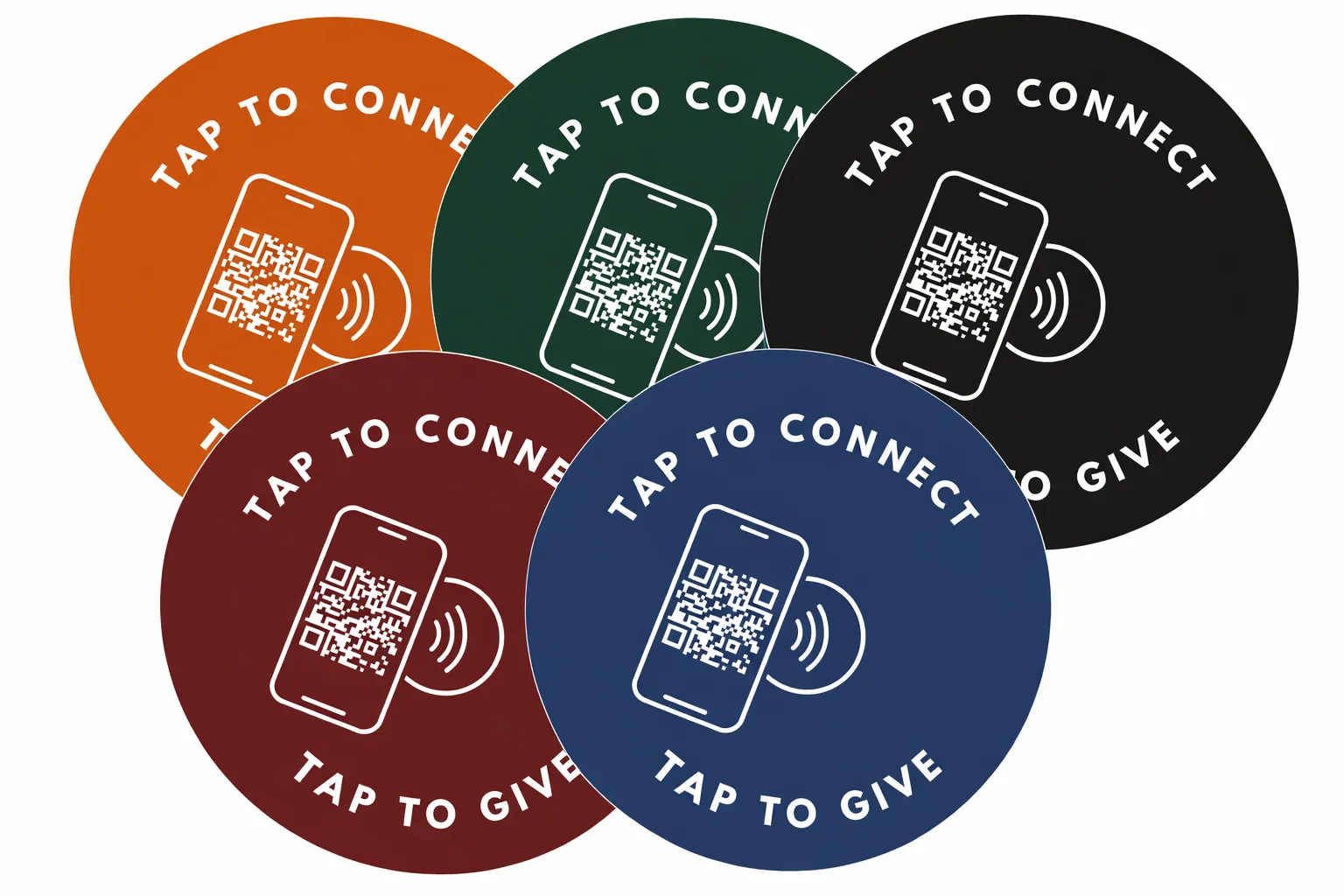
Adding NFC tap plates puts the giving page one tap away in the moment, instead of relying on someone to remember a URL later
See your church's plate and price in 30 seconds
Design it yourself on the next page. From $3.50 per plate, free shipping, no monthly fees.
Givelify and Tap.Giving Do Different Jobs
Most pastors who put these two side by side are not actually choosing between them. They are trying to figure out where each one fits. Givelify is a giving platform built around a mobile app and a hosted web page. A donor downloads Givelify, searches for the church by name, picks an amount, and gives. The church sees the gift in the Givelify dashboard. Givelify processes the donation, handles receipts, and stores the donor record.
Tap.Giving sells the hardware that puts a giving moment inside the service. Specifically, NFC tap plates that mount on chair backs or pew backs. Someone taps a phone, the phone opens your existing giving page (the Givelify page, a Tithely link, a Planning Center URL, whatever you already use), and the gift completes in about eight seconds. We are not a payment processor. We sell the hardware. The church keeps Givelify or any other platform underneath.
So the question is not really “Givelify or plates. Givelify answers part of that gap by removing the “mail a check” barrier. Plates answer the rest of it by moving the giving moment into the room where the sermon is happening.
The two work together. The plate can encode your Givelify URL or, for guests, a faster web giving page that skips the app install. We dig into the in-service trigger problem in NFC tap-to-give plates and faster in-service giving and in the QR codes vs NFC comparison
What Givelify Actually Costs in 2026
Givelify is genuinely free up front. There is no monthly platform fee, no setup fee, and no annual contract. The way Givelify makes money is the processing fee on every gift, which is 2.9% plus $0.30. That is the same headline rate Stripe charges anyone, and it is the same rate Tithely, Pushpay, and most other platforms pass through. So Givelify is not cheaper because it has a special rate. It is cheaper because the platform layer is zero.
| Cost line | Givelify (2026) | Notes |
|---|---|---|
| Setup fee | $0 | Free account, no minimum |
| Monthly platform fee | $0 | No tiers, no contracts |
| Processing fee | 2.9% + $0.30 per gift | Standard card-processing rate |
| Native NFC hardware | None | App and web only |
| Annual cost on $234k in giving | ~$7,500 in processing | Comes out of the gifts, not invoiced |
The flip side of free is that Givelify owns the donor experience. A first-time guest who hears “give through Givelify” from the stage has to remember the app name, install it, search for the church, and finish the gift on their own time. A meaningful percentage do not. That is the friction NFC tap plates are designed to remove. The processing economics of contactless giving through plates are identical (you still pay 2.9% plus $0.30 to whatever processor sits underneath), but the participation is not.
If you want a side-by-side of Givelify against the SaaS platforms with monthly fees, see Tithely vs Tap.Giving and Pushpay vs Tap.Giving. Givelify is the cheapest platform layer of the three by a wide margin.
5-Year Cost: Givelify Alone vs Givelify Plus Plates
Because Givelify has no platform fee, this is not a “save thousands by switching” comparison. It is a “what does adding hardware cost, and what does it buy you” comparison. The scenario: a 200-seat church receiving roughly $234,000 a year in giving, on Givelify already. We hold processing fees equal on both columns because both routes go through 2.9% plus $0.30 underneath.
| Cost line (200-seat church) | Givelify alone | Givelify + Tap.Giving plates |
|---|---|---|
| Setup / hardware | $0 | $800 (200 plates × $4.00, one-time) |
| Year 1 platform fee | $0 | $0 (Givelify still free) |
| Years 2-5 platform fees | $0 | $0 |
| 5-year processing (on current giving) | ~$37,500 | ~$37,500 |
| 5-year hardware + platform spend | $0 | $800 one-time |
| Typical in-service participation | Give later, if they remember | In the seat, in the moment |
The math the table does not capture: a participation lift of even 10% on a $234k base is more than $23,000 in additional annual giving. The $800 one-time hardware cost pays for itself many times over if the lift is even a fraction of what we see in the field. See NFC giving ROI by the numbers for the unit math.
A 100-seat church running the same scenario spends $500 once on plates. A 400-seat church spends $1,400. Plate pricing drops as quantity climbs, which is why the per-seat cost falls from $5.00 (100 to 199 plates) to $4.00 (200 to 399) to $3.50 (400 and up). See our pricing page for the full quantity table.
Feature Matrix: App vs Plate
The honest side-by-side. Givelify and Tap.Giving plates are complementary, not opposed, but it helps to see where each one carries the load. Pastors comparing church giving technology often discover they want both, not either-or.
| Capability | Givelify | Tap.Giving plates |
|---|---|---|
| Hosted giving page | Yes (in-app and web) | N/A (we are hardware) |
| Donor app | Yes (iOS and Android) | No app required on either side |
| In-service tap to donate | No native NFC | Yes (branded 4-inch plates) |
| Recurring giving | Yes | Handled by the giving platform |
| Donor receipts and statements | Yes | Handled by the giving platform |
| Works with platforms other than Givelify | No (Givelify is the platform) | Yes (Tithely, Pushpay, Subsplash, Donorbox, Anedot, Planning Center, more) |
| Monthly fee | $0 | $0 from us |
| Hardware cost | $0 | $3.50 to $5.00 per plate, one-time |
| Time to first donation | Same day (donor must install app or visit page) | 2-3 weeks (plate production + mount) |
Givelify owns the post-service experience: the app that donors can return to from their couch, the recurring schedule, the year-end statement. Plates own the in-service moment: the prompt during the offering, the guest who sees a plate on the chair and taps. They are designed for different parts of the giving journey. For the broader case on why hardware in the room matters for participation, see ways to increase in-service giving.
When Givelify Alone Is the Right Call
The honest carve-out. Givelify without plates is enough for some churches, and we will say so. Stick with Givelify alone if all of the following are true:
- Your in-service giving is already healthy and not the metric you are trying to lift.
- Your donor base skews older and prefers to give from home with planning, not in the moment.
- Your church does not have a regular in-person service rhythm (online-first, multi-site without a physical hub, etc.).
- You are early in a church plant with no hardware budget at all.
For church plants on a tight start-up budget, our cheapest-setup guide for small churches is a better starting point than a hardware purchase. See NFC giving for small churches and NFC giving explained for the basics before you decide.
When to Add Tap.Giving Plates to Givelify
Add NFC tap plates on top of Givelify if any of these match. Most churches we talk to recognize themselves in two or three.
- In-service giving has dropped since the offering tray went away during COVID and online giving has not closed the gap.
- You have a steady flow of first-time guests who do not have your Givelify name memorized.
- You announce giving from the stage every week and watch most people sit motionless during the prompt.
- You want a digital giving for churches answer that does not require a guest to install anything.
- You are happy with Givelify and want to keep it, not replace it.
Two practical notes on running plates with Givelify. First, the plate can encode either your Givelify page or a faster mobile-web giving URL. We usually suggest the web URL for first-time guests because it skips the app install step, then pointing returning givers back to the Givelify app for recurring schedules. Second, the plates work with whatever you use, so if you ever move off Givelify later (to Tithely, Anedot, Planning Center, something else) the plates do not have to be replaced. We re-encode them.
For the wider context on hardware-first vs platform-first thinking, see how tap to give works for churches and NFC tap plates and church growth. According to a Barna Group study, generosity habits are deeply tied to the worship moment itself, which is why putting the giving prompt back in the service tends to move the number more than tuning the platform underneath.
Keep Givelify. Add tap to give in your service.
One-time hardware. No monthly fees from us. Works with Givelify, Tithely, Pushpay, Subsplash, Donorbox, Anedot, and Planning Center. Most churches are tapping by week four.
Start a quote to get 10% off for 7 days
FAQ: Givelify vs Tap.Giving
How much does Givelify cost a church?
Givelify has no monthly fee and no setup fee for the church. It takes 2.9% plus $0.30 per donation, the same processing rate Stripe-based platforms charge. The cost is paid out of each gift, not invoiced to the church. A 200-seat church receiving about $234,000 a year in digital giving would see roughly $7,500 in processing fees flow through Givelify in a year.
Does Givelify support NFC tap-to-give natively?
No. Givelify is an app and website. There is no Givelify-branded NFC product. Churches that want in-service contactless giving usually pair Givelify with NFC tap plates from a hardware vendor like Tap.Giving. The plate encodes the church’s Givelify page or its mobile-web giving URL. See our Givelify tap-to-give setup guide for the step-by-step.
Can Tap.Giving plates open Givelify when someone taps?
Yes. We can encode the plate to open your church’s Givelify giving page directly, or to open a faster mobile-web giving form if you have one. Most churches we work with use the web URL because it skips the app-install step for first-time givers. You can keep using Givelify for everything else (recurring gifts, statements, donor data).
Why add NFC tap plates if Givelify is already free?
Cost is not the reason. Participation is. The friction is the gap. Givelify alone requires the giver to remember the app, search for the church, and complete the gift on their own time. Plates put the giving moment back in the service, which is when first-time givers are most likely to act.
What do Tap.Giving plates cost vs Givelify?
Givelify is free up front and runs 2.9% plus $0.30 on every gift. Tap.Giving plates are a one-time hardware purchase at $5.00 each (100 to 199 plates), $4.00 each (200 to 399), or $3.50 each (400 and up). Free shipping. No monthly fee from us. A 200-seat church spends $800 once for 200 plates and keeps Givelify or any other platform for processing.
Is Givelify still the right giving platform for our church?
For many small to mid-sized churches, yes. The price is right, the donor experience inside the Givelify app is straightforward, and the platform handles reporting and donor records well enough for most needs. The trade-off is that Givelify is app-and-search-first, which adds friction for the donor in the pew. Pair it with NFC tap plates if you want in-service giving without forcing an app install on a guest.
How long does it take to add tap plates to a Givelify church?
About two to three weeks from artwork approval to delivery. Week one: confirm the giving URL with us (Givelify page or a mobile-web giving page). Weeks two to four: plate production and shipping. Week five: mount and announce. We have a four-week rollout template in our launch guide.
Related Articles
Givelify Tap-to-Give Setup Guide
Step-by-step on encoding a plate with your Givelify URL and getting your first tap during a Sunday service.
ComparisonPushpay vs Tap.Giving (2026)
If Givelify is the cheap end of the platform spectrum, Pushpay is the expensive one. Full 5-year cost math inside.
Guide