How to Turn On NFC on Android for Tap to Give
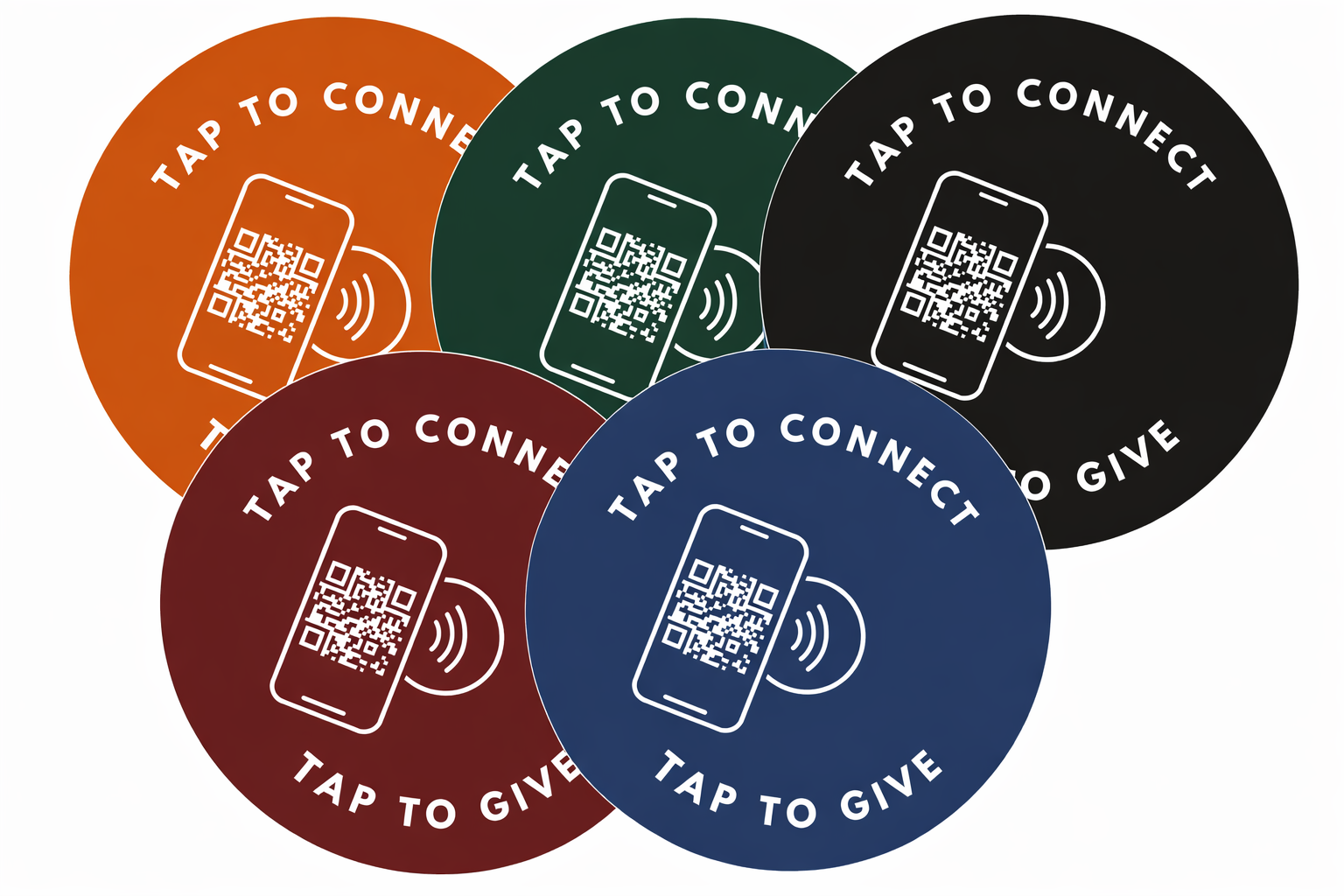
To turn on NFC on an Android phone, open Settings, search for NFC, and switch the toggle on. On most Samsung phones it lives under Connections, and on Google Pixel phones under Connected devices. iPhones since the XS keep NFC on automatically. Once NFC is on, tapping a Tap.Giving plate opens your church's giving page in about 8 seconds, with no app required.
Of smartphones in use today have NFC built in, so almost everyone in your building can tap to give once the setting is on.
Key facts
- The fastest way to find NFC on any Android is to search "NFC" in the Settings search bar.
- On Samsung it is under Connections; on Google Pixel it is under Connected devices.
- Every iPhone since the XS (2018) keeps NFC on automatically. There is no toggle to flip.
- If a plate will not tap, unlock the phone and hold the top third of its back flat against the plate.
- A Tap.Giving plate opens your existing giving page in about 8 seconds, no app to download.
See your church's plate and price in 30 seconds
Design it yourself on the next page. From $3.50 per plate, free shipping, no monthly fees.
How Do You Turn On NFC on an Android Phone?
Turning on NFC takes about a minute. The wording differs slightly between phone brands, but this three-step path works on every version of Android, and it is the same setting whether you want to tap to pay, tap to give, or read an NFC tag.
- Open Settings. Swipe down and tap the gear icon, or open the Settings app from your app drawer.
- Search for NFC. Tap the search bar at the top of Settings and type
NFC. This jumps you straight to the toggle without hunting through menus, which is the single fastest way on any phone. - Toggle NFC on. Tap the NFC result and switch it on. If you also see "Contactless payments" or "Tap and pay," you can leave those as they are; the plain NFC toggle is all you need to tap and give.
That is the whole job. NFC uses almost no battery when it is idle, so it is safe to leave on all the time. With it enabled, your phone can now read the NFC tap plates on the pew in front of you, the same way it already taps a card reader at the store.
Where NFC Lives on Samsung, Pixel, and Other Phones
If you would rather navigate the menus than search, the NFC toggle sits in a slightly different place on each brand. Here is where to switch on NFC on the most common phones.
| Phone | Where to find NFC |
|---|---|
| Samsung Galaxy | Settings → Connections → NFC and contactless payments |
| Google Pixel / stock Android | Settings → Connected devices → Connection preferences → NFC |
| Motorola, OnePlus, others | Settings → Connected devices, or search "NFC" in Settings |
| iPhone XS and newer | Always on. No setting to change. |
Many phones also let you add an NFC tile to the quick-settings shade you pull down from the top of the screen, so you can flip it on and off with one tap in the future. Once it is on, contactless giving works exactly like tapping your card, just aimed at a plate instead of a terminal.
Does the iPhone Need NFC Turned On?
No, and this trips up a lot of people who assume iPhone and Android work the same way. Every iPhone since the iPhone XS in 2018 keeps NFC reading on all the time, so there is no switch to find. An iPhone user just unlocks the phone, holds the top edge near the plate, and taps the notification that pops up.
Older models from the iPhone 7 through iPhone X can still read a plate, but they use the NFC scanner in Control Center rather than reading it in the background. In practice, if someone in your congregation has any iPhone from the last several years, tap to give simply works with zero setup. That is worth mentioning from the stage so iPhone users do not go looking for a setting that does not exist.
Want plates your members can just tap and give?
See pricing →How Do You Know If Your Phone Has NFC?
The quickest test is to search NFC in your Settings app. If a toggle appears, your phone has the chip. If nothing comes up, your phone probably lacks it, though that is rare on anything made in the last decade.
Roughly 95 percent of smartphones in use today include NFC, because it is the same chip that powers Apple Pay and Google Pay. For the small number of guests with an older or budget phone that has no NFC, every Tap.Giving plate also carries a QR code, and cash and check still work as they always have. Nobody is left out. If you are weighing the two entry points, our comparison of QR codes versus NFC for church giving breaks down when each one wins.
Why Won't My Phone Tap to Give Even With NFC On?
If NFC is on and the plate still does nothing, the fix is almost always one of these. Run through them in order and a stubborn tap usually starts working.
1. Unlock the phone first
A locked screen blocks most NFC reads for security. Wake and unlock the phone, then tap. This is the most common reason a first attempt fails.
2. Aim the right part of the phone
The NFC antenna sits near the top on most Android phones and at the very top on iPhones. Hold the top third of the back of the phone flat against the plate and hold it there for a full second, rather than a quick swipe.
3. Remove a thick or metal case
A heavy wallet case or a metal case can block the short-range signal. Slip it off, tap again, and it usually reads instantly. A pop-socket or thick card stack in the same spot can do the same thing.
If none of that works, check that the phone is not in airplane mode and that the plate face is clean. Well-made NFC tap plates are sealed and rated to last for years of taps, which is why we cover how long NFC giving plates last in a separate guide.
What NFC Has to Do With Church Giving
If you searched how to switch on NFC because a giving plate at church would not respond, here is the whole picture. NFC, short for near-field communication, is the short-range wireless standard that lets two devices talk when they are within about an inch. It is what makes tap to pay work, and it is what makes tap to give work.
A Tap.Giving plate is an NFC tap plate programmed with your church's giving URL. When a member taps their phone, the plate hands over that link and the phone opens your giving page in its browser. There is no app to download and no account to create, and the whole tap to donate flow takes about 8 seconds. Because the plate simply opens a web page, it works with whatever platform you already use, including Tithely, Pushpay, Subsplash, Donorbox, Givelify, and Anedot. We sell the hardware; your platform keeps handling the money. If you want the full walkthrough, how tap to give works for churches covers the giver experience end to end, and NFC giving explained goes deeper on the technology itself.
The cost is a one-time purchase, not a subscription. Plates run $5.00 each for 100-199, $4.00 each for 200-399, and $3.50 each for 400 or more, with free shipping and no monthly fees. A 200-seat church ordering 200 plates pays $800 once, and The first-order discount is 10% for 7 days from the quote. See the full breakdown on our pricing page, or read more about the hardware on the NFC FAQ.
This kind of church giving technology only helps if your congregation knows to tap, so it is worth a quick word from the front on launch Sunday. When you are ready, start your order and tell us your platform, and every plate will open the right giving page before it ships. Delivery typically runs 2-3 weeks from artwork approval with free shipping.
Bring tap to give to your church
One-time hardware cost. No monthly fees. Works with the giving platform you already use, and your members tap with the phone already in their pocket.
Start a quote to get 10% off for 7 days
FAQ: Turning On NFC
How do I switch on NFC on an Android phone?
Open Settings, tap the search bar, type NFC, tap the result, and switch the toggle on. That path works on any Android version. On Samsung Galaxy phones the setting lives under Connections, and on Google Pixel phones it lives under Connected devices. Once NFC is on, your phone can tap to give, tap to pay, and read NFC tags.
Where is the NFC setting on Android?
On most Samsung phones it is under Settings, then Connections, then NFC and contactless payments. On Google Pixel and stock Android it is under Settings, then Connected devices, then Connection preferences, then NFC. The fastest way on any phone is to search NFC in the Settings search bar, which jumps straight to the toggle.
Does the iPhone need NFC turned on for tap to give?
No. Every iPhone since the iPhone XS from 2018 keeps NFC on all the time for background tag reading, so there is no toggle to flip. Just unlock the phone and hold the top of it near the plate. Older models from the iPhone 7 through iPhone X read NFC tags through the Control Center scanner, but any recent iPhone taps to give with no setup.
How do I know if my phone has NFC?
Search NFC in your Settings app. If a toggle appears, your phone has it. Nearly all smartphones sold since 2015 include NFC, which is roughly 95 percent of phones in use today. If nothing shows up, your phone likely lacks the chip, and you can still give with the QR code printed on every Tap.Giving plate or with cash and check.
Why is my phone not tapping to give even though NFC is on?
Unlock the phone first, since a locked screen blocks most NFC reads. Hold the top third of the back of the phone flat against the plate and wait a full second. Remove any thick or metal case, which can block the signal. If a link still does not open, the plate may be dirty or the phone may be in an NFC-blocking mode like airplane mode.
Is turning on NFC safe?
Yes. NFC only works within about an inch, so a phone cannot be read from across a room, and it does nothing until you deliberately tap something. Tapping a Tap.Giving plate opens your church's normal giving page in your browser. No app, account, or card details are stored on the plate, and you confirm every gift on your own phone before anything happens.
What does NFC have to do with church giving?
NFC is the same short-range technology behind Apple Pay and Google Pay. A Tap.Giving plate is an NFC tap plate programmed with your church's giving URL, so when a member taps their phone the giving page opens in about 8 seconds. It works with Tithely, Pushpay, Subsplash, Donorbox, Givelify, and Anedot, because the plate opens your existing page rather than replacing your platform. See full pricing.
Related Articles
How Tap to Give Works for Churches
The plain-English walkthrough of the eight-second giver experience, from tap to confirmation.
GuideQR Codes vs NFC for Church Giving
When a tap wins, when a scan wins, and why the best plates offer both on one face.
GuideNFC Giving Explained
The church tech guide to how near-field communication turns a phone tap into a gift.