Multisite Church Tap-to-Give: Cost Per Campus (2026)
Multisite churches can deploy tap to give across every campus for a single one-time hardware spend. A 5-campus church averaging 50 seats per location pays $1,000 for 250 NFC tap plates at $4.00 each, with no monthly per-location fees. Each campus opens the same Tithely, Pushpay, Subsplash, or Planning Center giving page, with campus tags so reports stay clean per location.
$200
Average hardware cost per 50-seat campus, one-time. $1,000 covers a 5-campus church. No monthly per-location fee.
See your church's plate and price in 30 seconds
Design it yourself on the next page. From $3.50 per plate, free shipping, no monthly fees.
The Multisite Giving Problem
Multisite churches solve preaching at scale. Most still struggle with giving at scale. A campus pastor in a rented school cafeteria does not want to drag a kiosk to setup each week. A central finance team does not want to reconcile six different giving channels across six locations. And nobody wants to triple the per-location SaaS bill just to put a giving option in front of every chair.
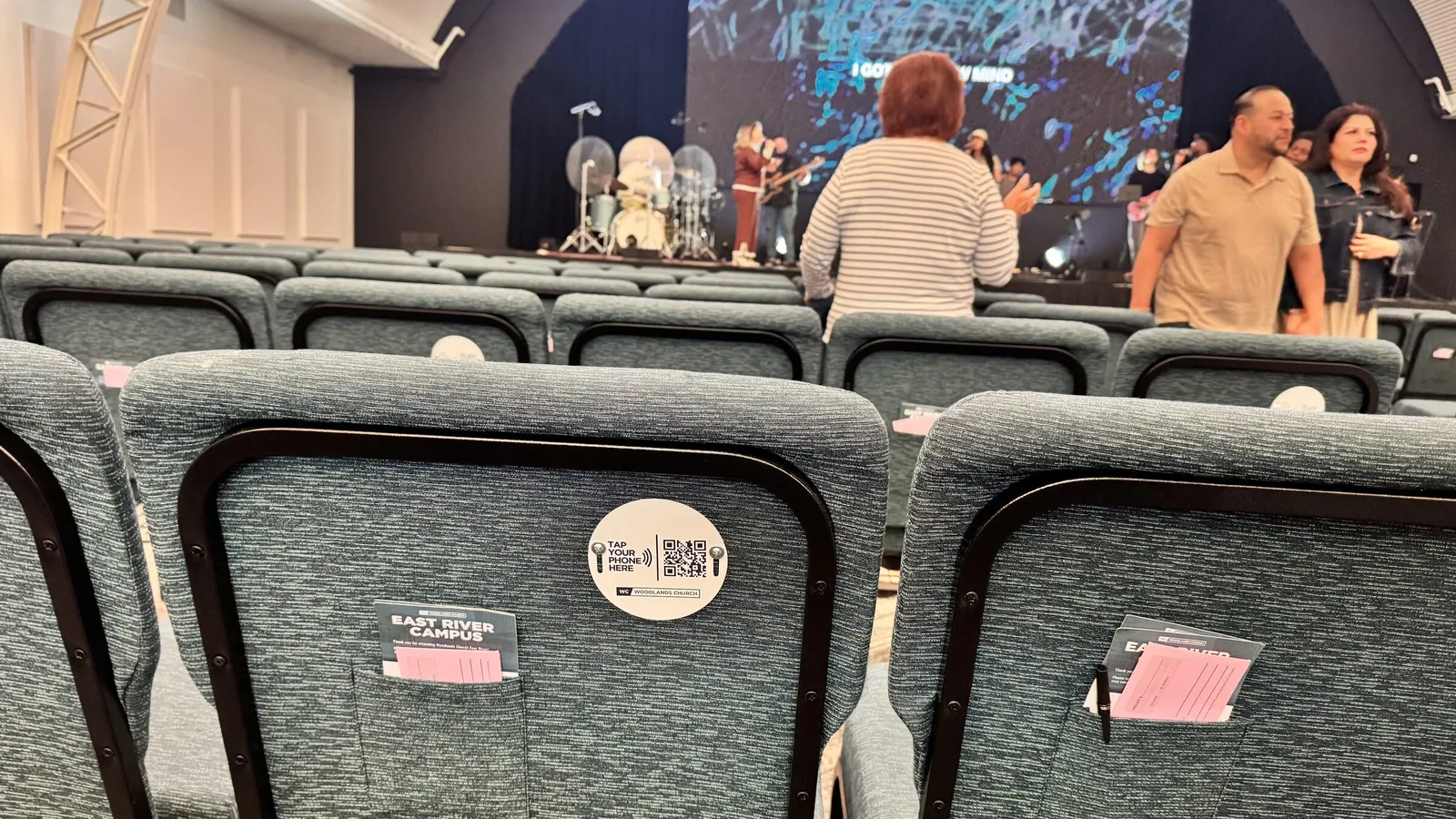
NFC tap plates fix the in-service problem with a single, portable, one-time spend. A plate is a printed disc with a chip inside. It stores a URL. It has no battery, no Wi-Fi, no app, and no monthly cost. You put one on every seat at every campus, and giving is suddenly the same eight-second experience whether you are at the flagship or the new launch site that meets in a school auditorium.
This works because Tap.Giving is hardware, not a payment processor. The church keeps Pushpay, Subsplash, Tithely, Planning Center Giving, Realm, or whatever stack already exists. The plate just hands the giver a phone-friendly URL that opens the campus-specific giving page. Contactless giving works without any campus-side software install. For the technical companion, see how tap-to-give actually works and our setup overview.
How Tap-to-Give Works Across Campuses
The mechanics are the same as a single-site rollout, with one twist: each campus encodes a different URL on its plates. Same form factor, same chip, same QR fallback on the front. Different destination per location.
Each campus has its own giving URL or campus tag.
Pushpay calls it a campus picker. Subsplash calls it a fund or campus. Tithely lets you build campus-tagged forms. Planning Center Giving uses campus settings. Whatever the term, the destination URL is unique per location.
We encode each batch of plates with the campus URL.
When you order, send a spreadsheet with two columns: campus name and giving URL. We split the production file by campus and label the boxes so the West campus plates arrive in one box and the South campus plates arrive in another.
A giver taps, the page loads, the gift records to the right campus.
The giver never sees a campus picker on an in-service plate. They tap, choose an amount, and pay with Apple Pay, Google Pay, or a card. The platform automatically tags the donation with the campus, because the URL already carried that tag.
Central finance gets clean reports without manual reconciliation.
Pushpay's campus dashboard, Subsplash's fund reports, Tithely's tagged exports, and Planning Center's campus filters all keep the campus attribution intact. No spreadsheet stitching at the end of the month.
Because NFC tap plates ride on top of the giving platform you already pay for, the church is not stacking another SaaS bill per campus. The plate is the only new cost, and it only happens once. This is one of the few pieces of church giving technology where the bill genuinely stops.
Cost Per Campus: 3, 5, and 10 Locations
Tap.Giving plates are $5.00 each for 100 to 199, $4.00 each for 200 to 399, and $3.50 each for 400 or more. Free shipping, no setup fee, no monthly fee, no transaction fee from us. The big lever for multisite is the quantity tier: a combined order across campuses usually drops you into the next tier and saves real money.
| Multisite Footprint | Plates Ordered | Tier Price | Total, One-Time | Per Campus |
|---|---|---|---|---|
| 3 campuses, 50 seats each | 160 | $5.00 | $720 | $240 |
| 5 campuses, 50 seats each | 250 | $4.00 | $1,000 | $200 |
| 5 campuses, 100 seats each | 510 | $3.50 | $1,785 | $357 |
| 10 campuses, 60 seats each | 615 | $3.50 | $2,152 | $215 |
| Flagship plus 4 satellites (300+50+50+50+50) | 520 | $3.50 | $1,820 | Varies |
Compare those numbers to a typical multisite SaaS line. A church running Pushpay across five campuses can easily clear $17,000 per year in subscription before transaction fees. We are not arguing you stop using Pushpay; we are pointing out that the in-service tap layer does not need to add another recurring bill. For a deeper look at the platform side, our Pushpay vs Tap.Giving comparison and our Subsplash Tap vs Tap.Giving breakdown walk the math.
A new church or church plant satellite often qualifies for the 7-day first-order discount. That takes 10% off the first order, which lands a 5-campus, 250-plate buy at $900 instead of $1,000. Most multisite finance teams have spent more than that on lobby signage in a single quarter.
Routing Donations to the Right Campus
Routing is the part most central finance teams worry about. The good news is that every major platform with a multisite mode already solves it. The plate just inherits whatever routing rule you already configured.
| Platform | Multisite Mechanism | What to Encode |
|---|---|---|
| Pushpay | Campus picker on each giving link | Campus-specific Pushpay URL |
| Subsplash | Funds and campus tags | Subsplash giving URL tagged to campus |
| Tithely | Per-campus giving forms or fund codes | tithe.ly form URL per campus |
| Planning Center Giving | Campus settings on the giving page | Church Center giving URL with campus parameter |
| Realm Connect | Campus and fund filters | Realm online giving URL tagged to campus |
| Donorbox | Separate campaign per campus | donorbox.org campaign URL per campus |
Confirm one piece before placing the order: open the campus URL on a phone, walk through a real donation, and check that the gift shows under the right campus in the reporting tool. If that test works once, it will work for every plate. For platform-specific setup, see our Planning Center Giving setup guide, our Pushpay tap-to-give setup walkthrough, and our Tithely setup playbook.
Rollout Sequence for a Multisite Launch
A multisite rollout has more moving parts than a single-site launch, but it does not take longer. The trick is to launch one campus first as the pilot, then echo what worked across the rest.
- Week 1. Confirm one campus-specific URL per location. Test each on a phone. Decide whether plates will encode the URL with or without a campus picker.
- Week 2. Order plates for all campuses in one combined batch. Send the campus mapping spreadsheet (campus name plus URL plus quantity). Aim for the next tier break.
- Week 3 to 4. Plates arrive in labeled campus boxes. Volunteer teams mount plates on chair backs, pews, or seat-back pockets. Use our mounting guide for church chairs when most campuses are running portable setups.
- Week 5. Pilot campus does a stage demo and announcement. A 30-second demonstration with a campus pastor's phone is the entire training plan.
- Week 6 to 7. Roll the same demo script across the other campuses on the same Sunday or across two Sundays. Hand each campus pastor a short script and a stage plate to show.
- Week 8. Central finance pulls the first month's campus-tagged report. Compare in-service participation rates per campus, and flag any campus where adoption is below 30% so the central team can coach the lead.
A church that already runs a midweek staff huddle can compress this into four weeks. The campuses do not need to launch on the same Sunday, but launching them within two Sundays of each other keeps the central team's attention focused. Our broader launch playbook has the announcement scripts.
Reporting and Campus-Level Visibility
Multisite finance teams have a recurring fear: that a new giving channel will make the books harder. Tap plates do the opposite. Because the gift is already tagged with a campus when the giver taps, the report is clean before anybody touches a spreadsheet.
A useful pattern: pull a weekly campus-level report on Monday morning that shows in-service tap-to-donate count, average gift, and total. Most platforms can email this automatically. Over six to eight weeks the central team builds a benchmark per campus, so an outlier campus (a hot one or a slow one) becomes obvious.
Tap.Giving customers in the field have reported less friction after switching from a passing plate to NFC plates, and higher in-service participation in the seats where plates are mounted. Across multiple campuses, that participation rate tends to converge once the demo gets repeated. The campus that struggles is almost always the one whose pastor did not demo from the stage.
Three numbers worth tracking per campus
- Tap-to-give participation: percent of attendees who completed a gift on a plate that Sunday.
- First-time-giver rate: percent of gifts that came from a phone we had not seen before.
- Average tap gift: compare it to your average online gift; tap usually lands close, sometimes higher because there is no friction at the moment of the offering.
When Multisite Churches Should Skip Tap-to-Give
Plates are not the right tool for every multisite footprint. We would rather you order nothing than buy plates that sit in a closet. Three carve-outs worth naming honestly.
- Online-only campuses. If a campus exists entirely as a livestream with no in-person gathering, a tap plate has nothing to mount to. Stick with web giving for that campus and reserve plates for the in-person ones.
- Campuses without a working mobile giving page. The plate is a sign post. If the page it points at is broken or not mobile-friendly, plates make the problem more visible, not better. Fix the page first. We wrote about the most common reasons giving pages lose donations on a separate post.
- Churches that are mid-platform-migration. If you are switching from Pushpay to Subsplash next month, wait. Order after the new URLs are stable so plates do not need to be reprogrammed.
For most multisite churches with stable platforms and in-person services, the answer is simple: every campus, every seat, one combined order. Compare to QR codes versus NFC for church giving if you are still deciding between the two formats.
Ready to roll out tap-to-give across every campus?
One-time hardware. No monthly per-location fee. Works with the giving platform you already run, Tithely, Pushpay, Subsplash, Donorbox, Givelify, Anedot, or Planning Center Giving. Most multisite churches are tapping by week four.
Start a quote to get 10% off for 7 days
FAQ: Multisite Tap-to-Give Questions
Can one giving platform serve every campus of a multisite church?
Yes. Pushpay, Subsplash, Tithely, Planning Center Giving, and Realm all support multi-campus configurations. Each campus uses its own giving URL or campus tag, and donations route to the campus the giver chose. NFC tap plates work on top of whichever platform you already run, they just encode the right URL per location.
How many NFC tap plates does a multisite church need per campus?
The rule of thumb is one plate per seat, with a few spares per campus for replacements and a stage demo plate. A 50-seat campus orders about 55 plates; a 300-seat flagship orders about 320. Across five campuses averaging 50 seats, the order lands near 275 plates total, which qualifies for the 200+ tier price. For sizing math, see our sizing guide.
Do we need to order plates per campus or in one batch?
Order in one batch whenever you can. A combined order crosses quantity tiers faster, so a five-campus order at 250 plates lands at $4.00 each instead of $5.00 each at the 100 tier. Plates can still be encoded per campus inside that one purchase. We split the file by campus URL during programming and ship in campus-labeled boxes.
How do reports stay clean when every campus uses tap to give?
Pushpay, Subsplash, Tithely, and Planning Center Giving let you tag each giving page with a campus or fund. Each campus plate encodes a URL with that tag attached, so the platform records the donation against the right campus automatically. No extra reconciliation work for the central finance team.
Can a guest at one campus give to another campus?
If the platform has a campus picker on the giving page, the guest can switch the destination before completing the gift. If you want to lock a plate to its own campus, the plate just encodes the campus-specific URL with no picker. Most multisite churches use the locked approach for in-service plates and keep the picker on the website for general giving.
What does tap-to-give cost a 10-campus church?
A 10-campus church averaging 60 seats orders about 600 plates. At the 400+ tier ($3.50 each), that is $2,100 one-time with free shipping. No setup fee, no monthly fee, no per-transaction fee from Tap.Giving. The existing giving platform charges whatever it normally charges per donation, typically 2.9% + $0.30.
Does Tap.Giving work with a campus app or only with web giving?
The plate opens a URL, so anything that lives at a URL works. That includes web giving pages, app deep links (custom URL schemes), and hosted forms. Apps like Subsplash and Church Center hand you a URL you can encode straight to the plate. The giver still does not need to install anything; church NFC tags and tap tags for churches are about removing friction, not adding new software.
Related Articles
How Many NFC Tap Plates Does Your Church Need? A 2026 Sizing Guide
Seat-by-seat math for figuring out how many plates to order, with a worksheet for portable and traditional rooms.
ComparisonPushpay vs Tap.Giving: 5-Year Cost Compared (2026)
A multisite-friendly cost comparison for the platform that runs the most US multisite churches.
ComparisonPlanning Center Giving vs Tap.Giving (2026)
How Church Center web giving pairs with NFC tap plates across multiple campuses.