Google Pay for Churches: Setup, Fees, and Which Platforms
Yes, your church can accept Google Pay, and you do not sign up for anything new to do it. On most giving platforms the Google Pay button is already there: it shows up for any giver on an Android phone with a card saved in Google Wallet. Pair that with an NFC tap plate in the pew and an Android giver completes a gift in about 8 seconds. Here is how it works in 2026, what the Google Wallet rebrand changed (and did not), which platforms support it, and what it costs to roll out for under $1,000.
Average tap-to-donate time on Android with Google Pay saved in Google Wallet. About 4x faster than typing a card on a phone.
See your church's plate and price in 30 seconds
Design it yourself on the next page. From $3.50 per plate, free shipping, no monthly fees.
How Google Pay Works for Church Donations
Google Pay for churches is not a product you sign up for. It is a checkout option that already shows up on most modern giving pages when the giver is on an Android phone with a card saved in Google Wallet. The flow looks like this:
- An Android user opens your church giving page (any browser, but Chrome is most common).
- They choose an amount and tap the checkout button.
- If the giving platform supports the Google Pay button (most do), it appears alongside the card form.
- The giver taps Google Pay, confirms with a fingerprint or face match, and the donation completes.
What the church sees on its end is nothing new. The donation lands in the same giving platform dashboard as any other online gift. The deposit hits the same bank account on the same schedule. Reporting, receipts, recurring schedules, and donor records all stay where they are. Google Pay is just a faster checkout button on the same page. The plate itself is method-agnostic, so a church built around a different app can point it at that page instead; here is the same idea for a Cash App tap-to-give setup.
The reason this matters is friction. First-time givers abandon card forms at a high rate because they have to dig out a wallet, type 16 digits, and confirm an address. A Google Pay tap skips all of that. Most churches that switch to tap to donate and Google Pay see in-service participation rise quickly, because the path from intent to gift went from 60 seconds to closer to 8.
Google Pay vs Google Wallet: What Actually Changed
There is some confusion here that is worth clearing up in two sentences. In June 2024, Google retired the standalone Google Pay app in the United States and moved tap-to-pay and saved cards into Google Wallet. The Google Pay brand still exists as the checkout button on websites and the tap-to-pay capability at point-of-sale terminals.
What this means for churches
- Givers on Android still see a "Google Pay" button at checkout. That has not changed.
- The card lives in Google Wallet on the phone, not in a separate Google Pay app.
- For NFC giving, nothing changed at all. The phone reads the plate the same way it always has.
- If a giver asks why their Google Pay app disappeared, point them to Google Wallet, which already has their card.
Outside the US, Google Pay continued as a standalone app in many markets. If your church streams to a multi-country audience, treat both names as the same thing for practical purposes. The underlying NFC and tokenization standards (NFC is the same chip your members use to tap a card at a coffee shop) are identical worldwide.
Which Church Giving Platforms Support Google Pay
The short version: if your platform processes through Stripe, Adyen, Braintree, or a similar modern processor, Google Pay shows up automatically on Android. That covers almost every platform a church would consider.
| Platform | Google Pay on Giving Page | Notes |
|---|---|---|
| Tithely | Yes | Appears on mobile Chrome at the card step. See Tithely tap setup. |
| Pushpay | Yes | Mobile-web checkout shows the button. Pushpay setup walkthrough. |
| Subsplash | Yes | Surfaced inside the Subsplash giving form. |
| Donorbox | Yes | Toggle Google Pay on in dashboard settings. |
| Givelify | Yes | In-app and web both accept Google Pay. |
| Anedot | Yes | Native button at the card step. |
| Planning Center Giving | Yes | Through Church Center on Android. |
| Nucleus Giving | Yes | Stripe-backed checkout shows Google Pay. |
If your platform is not listed and you cannot see a Google Pay button on an Android phone today, that is the question to ask your account rep before adding plates. The plate works either way (it just opens a web page), but Google Pay support speeds the donation by roughly 50 seconds for a first-time giver.
Why NFC Tap Plates Make Google Pay Work in the Room
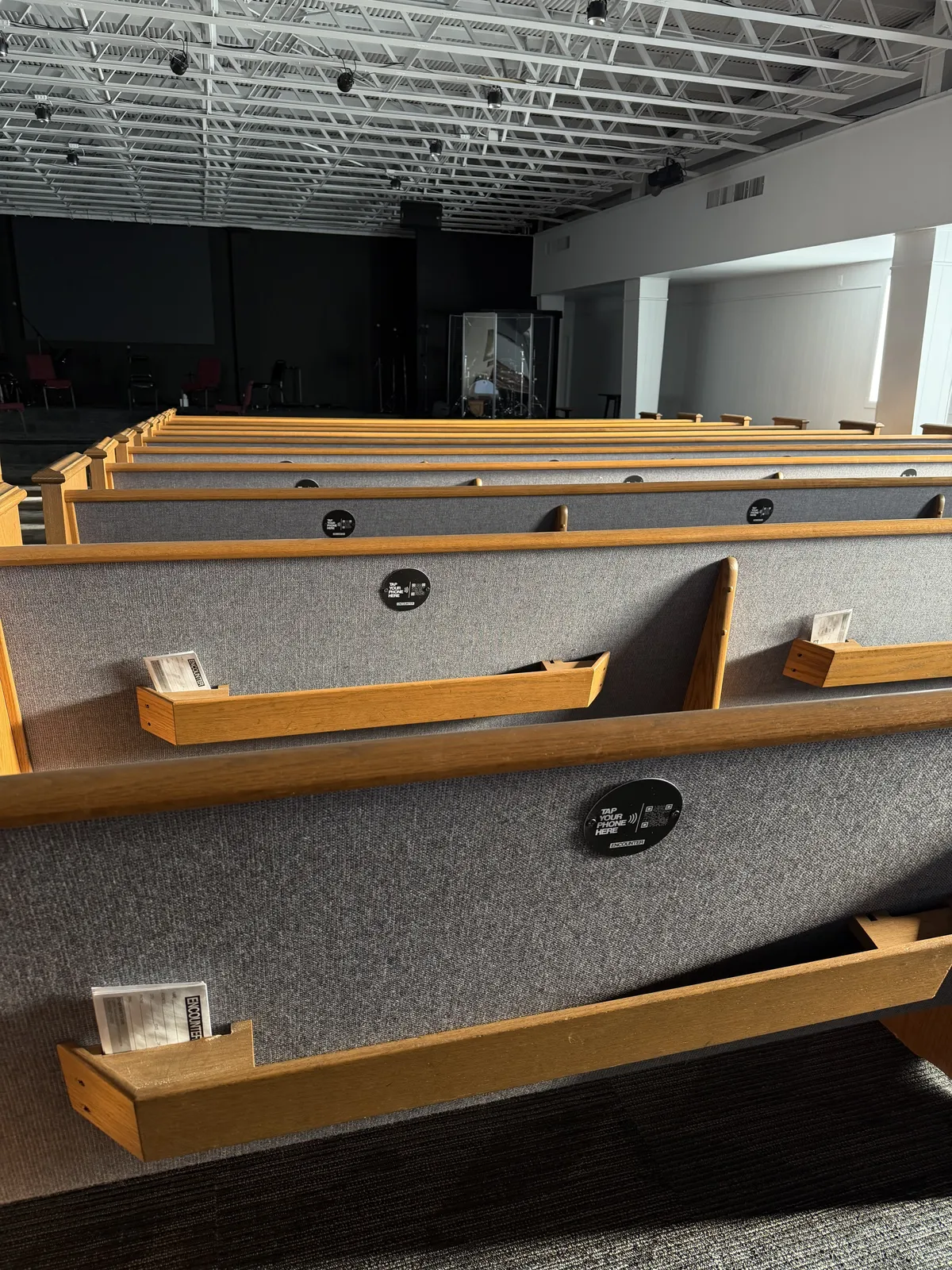
Google Pay on a website is useful. Google Pay paired with an NFC tap plate in the pew is what actually moves the in-service number. The reason is the URL problem. Most people will not type a church giving URL during a service, and a printed QR code requires aiming a camera at it. Both add friction. NFC tap plates beat QR codes by a wide margin because a tap is one motion.
Here is what happens when you place an NFC tap plate on the back of a pew or chair:
- An Android giver taps the plate with their phone.
- The phone shows a notification with your giving page URL. One tap opens it in Chrome.
- They choose an amount, see the Google Pay button, and confirm with a fingerprint.
- The donation lands in the church's giving platform, same as any online gift.
Total time, including the tap and the Google Pay confirmation, is about 8 seconds for a returning giver and closer to 20 for someone who has never given before. Contactless giving with NFC tap plates is the simplest path to making digital giving for churches feel as natural as dropping cash in the basket.
What It Costs to Roll Out
The Google Pay button itself is free. It comes with your giving platform. The only added cost to making the in-room experience work is the NFC tap plates and the printed signage you might already be using anyway. Here is the 5-year math for a 200-seat church compared to renting an in-pew NFC product from a giving platform.
| Year | Tap.Giving Plates (one-time) | Typical In-Pew NFC Subscription (~$99/mo) |
|---|---|---|
| Year 1 | $800 | $1,188 |
| Year 2 | $0 | $1,188 |
| Year 3 | $0 | $1,188 |
| Year 4 | $0 | $1,188 |
| Year 5 | $0 | $1,188 |
| 5-Year Total | $800 | $5,940 |
A 200-seat church saves about $5,140 over five years by buying plates once instead of renting an in-pew NFC product. Our pricing page has the full quantity breaks (100 to 1,000+ plates). The payment processor fee of 2.9% plus $0.30 still applies through your giving platform; that is industry standard and not specific to Google Pay. Watch for hidden platform fees when comparing.
The 4-Week Rollout Plan
A 200-seat church can be tapping with Google Pay in four weeks. This is the same timeline we use in our general launch guide, applied to the Android Google Pay context.
Week 1: Confirm your giving page accepts Google Pay
Open your existing giving page on an Android phone in Chrome. Add an amount. If a Google Pay button appears at checkout, you are ready. If not, ask your platform rep to enable it; most can flip a setting same-day.
Week 2: Order plates and approve the proof
A 200-seat church orders 200 plates at $4.00 each for $800. Add your logo and exact giving URL; the editable proof updates instantly. Production begins after artwork approval.
Week 3: Mount the plates
Adhesive backs for pews, screws for wood seat backs. Mounting guide here. Volunteer teams typically finish 200 plates in 60 to 90 minutes.
Week 4: Demo from the stage on Sunday
A 30-second demo before the offering is the single best move you can make. Show the tap, show the Google Pay confirmation, show the receipt. Sample script here.
By week six you should see a measurable lift in in-service participation. Track it in your platform's reports. Most churches see new first-time givers within the first two Sundays.
Ready to make Google Pay easy in your room?
One-time hardware. No monthly fees. Works with the giving platform you already use. Most churches are tapping by week four.
Start a quote to get 10% off for 7 days
FAQ: Common Questions Before Ordering
Does Google Pay work for church donations?
Yes. Any modern church giving page that uses Stripe, Adyen, Braintree, or similar processors will surface a Google Pay button when the giver is on Android with a card saved in Google Wallet. Tithely, Pushpay, Subsplash, Donorbox, Givelify, Anedot, and Planning Center Giving all support it.
Is Google Pay the same as Google Wallet?
In the United States, Google retired the standalone Google Pay app in June 2024 and moved tap-to-pay and saved cards into Google Wallet. The Google Pay brand still exists as the checkout button on websites and at terminals. For a church giver on Android, the experience is identical.
How do NFC tap-to-give plates connect to Google Pay?
The plate stores one thing: your church giving page URL. When an Android phone taps the plate, the phone opens the URL in Chrome. At checkout, if the platform supports Google Pay and the user has a card in Google Wallet, the button appears. A fingerprint confirms the gift in about 8 seconds.
Does Google Pay charge a fee for church donations?
Google Pay itself does not add a fee. The giving platform's normal payment processor fee applies, typically 2.9% plus $0.30 per transaction. That is the same fee a card-keyed donation would carry. Tap.Giving plates do not change this; we sell hardware only and charge no transaction fees.
Can older Android phones still use Google Pay at our giving page?
Any Android phone running Android 7 or newer with NFC and Google Wallet installed can pay this way. Phones older than that, or visitors without a saved card, can still give: the same giving page accepts a typed card, and our plates ship with a printed QR code fallback for any device that struggles with NFC.
What does it cost a church to start accepting Google Pay?
Zero, if your current giving platform already supports it (most do). To make Google Pay easy in the room during a service, the practical add-on is NFC tap-to-give plates. A 200-seat church pays $800 once for 200 plates. There are no monthly fees and no contract. The 7-day first-order discount takes 10 percent off your first order.
Will switching giving platforms break Google Pay support?
Probably not. The major giving platforms all support Google Pay through their processors. If you switch platforms later, Tap.Giving plates re-encode in minutes with the new URL, so you do not have to throw away the hardware. That portability is the practical case for buying plates instead of renting an in-pew NFC product tied to one monthly subscription.
Related Articles
How Tap to Give Works for Churches
A plain-English walkthrough of how NFC tap plates work for churches, what is inside the plate, and how it fits Tithely, Pushpay, Subsplash and others.
ComparisonQR Codes vs NFC for Church Giving
Why NFC tap plates beat QR codes for in-service giving, the friction data, and which platforms support both.
StrategyChurch Giving Without an App
Why a tap plate plus Apple Pay or Google Pay beats any app-based giving flow, and the friction math behind that claim.